
- "Administrative Degree Registration" Process

Click this link to view the registration procedures for each major.
(OR WELCOME BACK!)
Registration will be conducted primarily through an entirely online process.
Here you'll find the dates for the application periods for the various majors and academic years, as well as the different steps in the registration process.
Click on the image to enlarge it
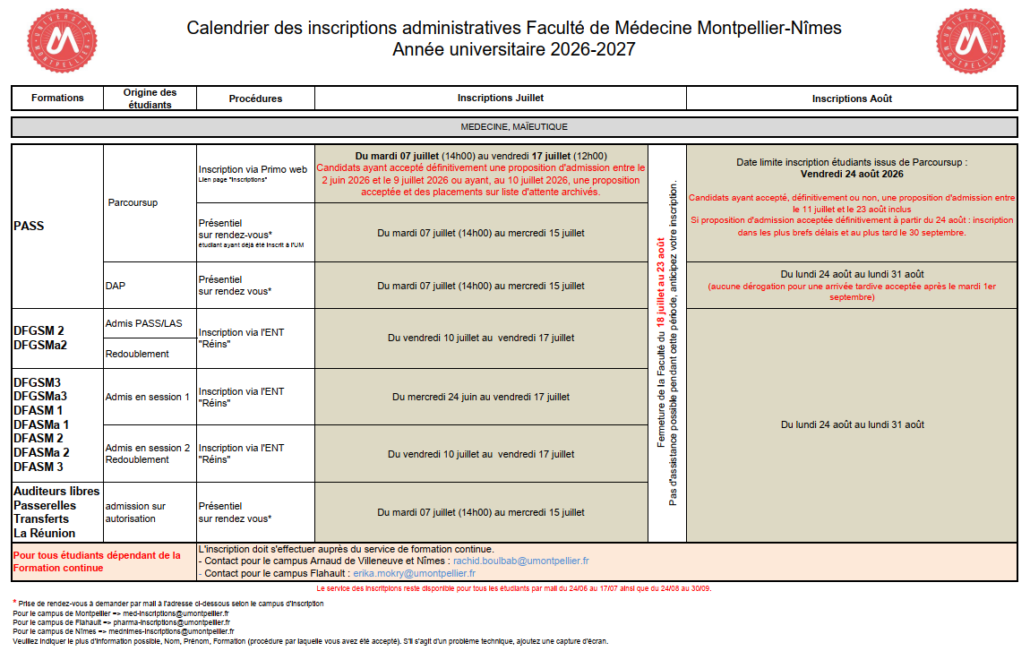
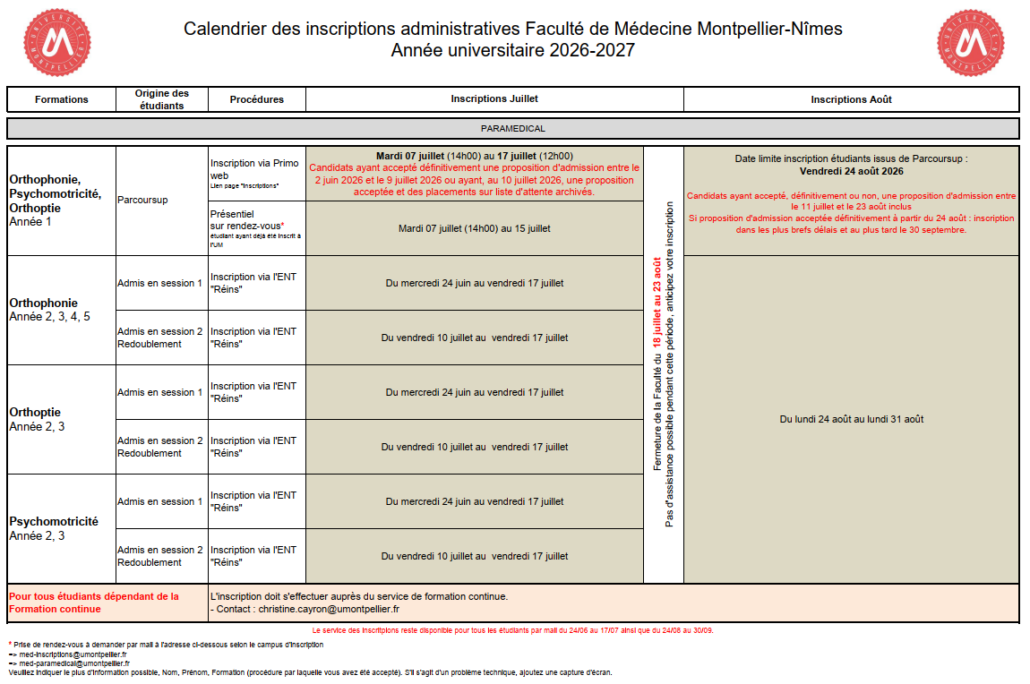
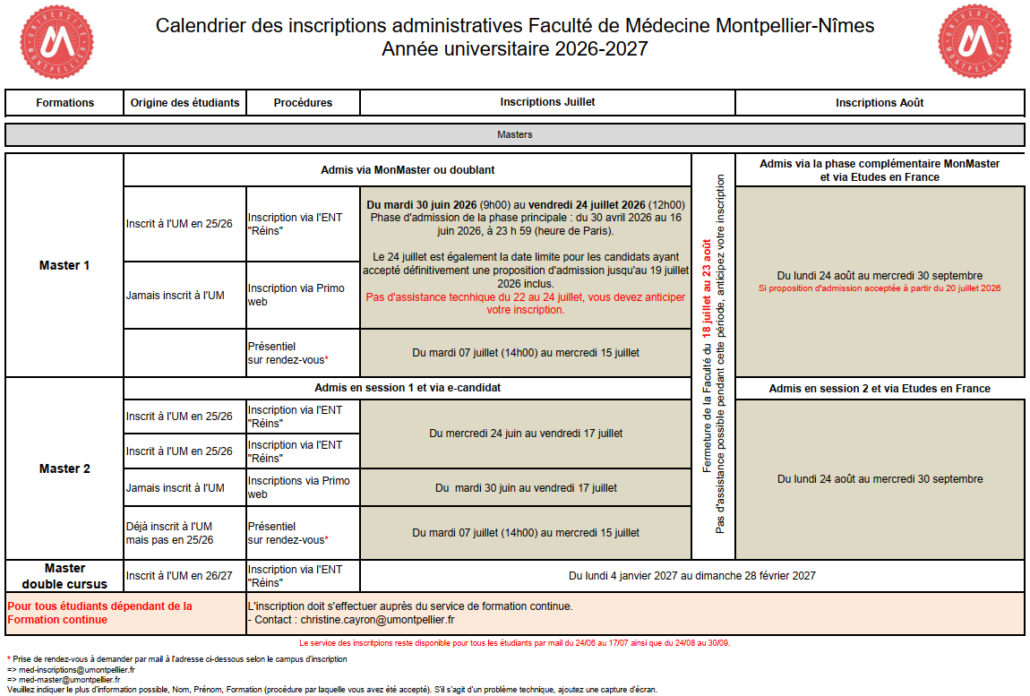
FIRST YEAR OF HEALTH STUDIES
The University of Montpellier’s Health Tutoring Program brings together three free student organizations to help students succeed in their first year of health studies. To this end, student “tutors” spread across three campuses (Nîmes Medical School, Montpellier Medical School, and the School of Pharmacy) regularly offer review sessions to help you best prepare for the demands of your first year. On this page, you’ll find a detailed overview of the tutoring organizations, their activities, and the pre-semester workshop taking place August 19–31!
If you’d like to sign up, visit the ASTM, TSN, and ATP tutoring pages.

Montpellier – Flahaut
The ATP, based at the School of Pharmacy, has been working with first-year students for years to support and assist them by ensuring equal opportunities and high-quality academic support. It is made up ofsecond-,third-, andfourth-year pharmacy students. We are responsible for PASS students at our campus, as well as LAS students from the Faculties of Law, Economics, and STAPS in Montpellier, and law students from the Faculty of Perpignan and its branch in Narbonne.

Montpellier – ADV
Located on the Arnaud de Villeneuve campus (new School of Medicine), the Montpellier Health Tutoring Association brings together second-year studentsnd, 3rd and4th-year students in medicine, midwifery, and dentistry. Committed to both equal opportunities in academic support and student well-being, we are responsible for the PASS programs at our campus, as well as the LAS programs in the Faculty of Sciences (SVSE and PCSI), the Paul Valéry campus (CMAM, Classical Literature, EPF, Psychology, and MIASHS), and the Biology branch in Mayotte.

Nîmes – Carémeau
The TSN is the tutoring association at the Montpellier School of Medicine, operating out of the Nîmes campus. We bring togethersecond- andthird-year medical and midwifery students. Our goal is to maximize equal access to health professions programs and to offer students academic support as well as well-being support. We will provide support to PASS students at our location, as well as to LAS students from the Nîmes Faculty (Psychology, Biology and Environment, and Law) and the Perpignan Faculty (Mathematics and Life and Earth Sciences).
Montpellier Association of Pharmacy Tutors – ATP
ATP_UM
@atp_um
Health Tutoring in Montpellier
tutoring-santemtp
@tutoratsantemtp
Health Tutoring in Nîmes
Tutoring_Health_Nîmes
@TutoSantéNîmes
Considered essential by nearly 96% of our students, the pre-semester orientation is organized by the tutoring teams in August to help future PASS students start the semester with confidence!

Studying health sciences also gives you the opportunity to become part of a very active student life!
Discover all the other student organizations at the Faculty right now by clicking the button below!
ABOUT REGISTRATION
Online Registration
How do I log in to the “Primoweb” UM app when registering for the first time?
Have your username (Parcoursup, eCandidat, or MonMaster)—which must be 10 characters long—your date of birth, and the email address you provided on the application platform ready.
You can find the necessary information on the registration app's home page.
I went through the Parcoursup, MonMaster, or eCandidat process .How do I log in to the registration application? Or , I’m getting a message that says “Unknown user.” What should I do?
Check the following points or log in with the correct credentials:
How do I log in to the “Réins web” app to re-enroll at UM?
First, log in to your UM IT account (ENT).
Next, click on the corresponding icon.
When I log in to the app, nothing happens. What should I do?
You likely have a problem with pop-up blocking (in your browser settings or via an ad-blocking add-on).
You’ll need to unblock them to sign up. It’s also a good idea to clear your browsing history.
I was enrolled at UM in a previous academic year but not in 2023–2024. I’m having trouble re-enrolling online. What should I do?
You should contact the registration office of your faculty (UFR) , which will explain the enrollment procedures to you.
Payment of Registration Fees
Tuition fees are set by ministerial decree. They include the fee for the degree and access to the University Library.
Details of the fees paid upon registration are listed:
Please note: These documents are issued only once the administrative registration process is complete (payment + verification of all supporting documents).
What are the available payment methods?
For online registration, payment must be made by credit card (Visa or MasterCard).
For on-site registration, you may pay by Visa or MasterCard credit card, or by check made payable to the University of Montpellier’s Accounting Officer.
For payment by bank transfer: contact your faculty (UFR) for instructions.
Registration will not be processed until payment is received. The registration office does not accept cash payments.
Can I delay the processing of my payment by check?
No. Registration payments are processed daily in accordance with current regulations. If you think you may have difficulty making a payment, please do not hesitate to contact the registration coordinator.
I don't have a way to pay. Can someone else pay the registration fees for me?
Yes. However, please make sure this third party is able to pay so that you don't end up with an outstanding balance with the university.
Is it possible to pay in installments? Yes , for enrollment in a national degree program and only for online payments. Payment in three installments is available for amounts of €100 or more. The first installment must be paid by credit card at the time of online enrollment. At that time, direct debit authorization will be set up for the remaining two installments. This payment method is not available if your credit card expires before the final scheduled payment.
Before making any payment in three installments, please ensure your credit card is valid for all three installments.
I'm having trouble paying online. What should I do?
Contact the registration office; they can offer you some solutions. For online payments, only Visa and Mastercard are accepted.
When I registered online, I indicated that I receive a means-tested scholarship (CROUS), but the amount requested does not match my situation. How can I correct this?
Go back to the “ANNUAL DATA” page of the registration application you used.
For the question: “What is the type of scholarship?” Select: “Higher education scholarship,” and for the question: “What is the nature of your financial aid?” Select: “Need-based scholarship.”
If your problem persists and you believe you are eligible for a scholarship, contact the registration office or the CROUS.
My payment was declined by the bank. What should I do?
Please contact your registration office as soon as possible. Until your account is in good standing, you will not be able to obtain your transcripts, certificate of completion, or diploma.
I’m registering online, but I don’t want to pay online with a credit card. What should I do?
When you register online, payment is required. You may be offered the option to pay in one lump sum or in three installments.
If you are unable to pay online, you will need to register in person by appointment. Contact the Faculty’s registration office for information on how to register.
I registered online, but my payment was declined. What does this mean?
Please note that payment is required for online registration. If your payment is declined, contact the registration office of the Faculty (UFR)/School/Institute to complete your registration.
Supporting Documents
I need to provide an official form of identification. What documents are accepted? Accepted documents : national ID card (front and back), passport, valid residence permit.
If you do not have any of these documents, a driver’s license in a format recognized by the European Union.
Documents not accepted: bus pass, train pass, etc.
I need to provide proof of school, college, or extracurricular liability insurance. What is liability insurance or school/college insurance?
Civil liability insurance covers the obligation of every individual to compensate others for damages caused through fault, carelessness, negligence, or by objects owned, rented, or borrowed.
All students must be covered by civil liability insurance as part of their studies (see the University of Montpellier’s internal regulations).
Where can I obtain a certificate of civil liability?
From your insurer, your health insurance provider, or when opening a bank account in France.
The certificate must include the words “civil liability.”
Important :
I need to provide a high school transcript. Where can I find it?
You can download your transcript by logging into your Cyclades account (Menu -> My Documents).
I need to submit a Parcoursup notification. Where can I find it?
You can download your Parcoursup notification by accessing your account on the Parcoursup website (My Dashboard -> Admission -> Certificate).
I need to submit a MonMaster notification. Where can I find it?
You can download your MonMaster notification by accessing your account on the MonMaster website (under “My Applications” and “My Work-Study Applications”).
I need to provide a summary of my online registration. Where can I find it?
To obtain a summary of your registration, you can download it from your digital account (ENT). Click on the “Registration Summary” icon.
I need to provide a passport photo. What format is accepted?
The photo will appear on the student ID card; it must have a plain background, no border, and be in “passport photo” format.
When uploading the photo online via the Pjweb application, only JPG and JPEG formats are accepted.
Please note: PDF files are NOT accepted.
I need to submit a sworn statement. Where can I find it?
Please find the PDF and Word versions of the form below.
If you submit your supporting documents online (using the PJWeb application), you can download the instructions for signing a PDF.
If you are unable to use the PDF form, you can use the Word version and insert your scanned signature (an image of your signature) into it, or print it out, fill it out, and scan it to resubmit it online via the PJWeb application.
I need to complete the Defense and Citizenship Day (JDC/JAPD). What should I do if I've lost my certificate of participation in the draft registration day?
French students under the age of 25 must provide proof of their status with regard to national service obligations in order to be authorized to register for exams and competitive examinations administered by public authorities.
Only one copy of the certificate is issued. However, before your 25th birthday, you may request a status certificate (by mail or email) from the National Service Center with jurisdiction over you (the one in your census department) or the one closest to your place of residence, provided you include a copy of your national ID card with your request.
I need to provide a CVEC certificate. Where can I find it?
Before enrolling at the university, you must log in to the cvec.etudiant.gouv.fr website to review the steps you need to take.
Depending on your situation, you will be asked to provide your CVEC number and/or your certificate when you register.
The CVEC process must be completed for the academic year of enrollment, namely 2024–2025.
Step 1: Complete the necessary steps at cvec.etudiant.gouv.fr. Be sure to have your INE number handy beforehand (make sure to spell your first and last names correctly).
Depending on your situation, either:
In either case, you will be issued a certificate: without it, you cannot complete your administrative registration.
Please note: For students who do not receive financial aid, we encourage you to log in now at mesServices.etudiant.gouv.fr to create an account and make the process easier for you.
If you enroll in multiple programs during the same academic year, this fee is due only at the time of your first enrollment.
The CVEC is a fee “intended to promote the reception and social, health, cultural, and athletic support of students and to strengthen preventive health and health education initiatives carried out for their benefit.”
Regardless of your situation (whether you have paid the CVEC or are exempt), you must provide a CVEC certificate when you register or re-register.
I am a minor. What document do I need to provide?
You must provide a registration authorization form signed by your legal guardians. Once completed, it will be kept in your file by the registration office.
I need to submit my supporting documents online via “PJ Web.” What file formats are accepted, and what is the maximum file size for each file?
How can I tell if the Admissions Office has received the supporting documents I submitted online via the “PJ Web” application?
You must log in to the “PJ Web” application for submitting supporting documents via the icon available in your ENT (Digital Workspace) and check the validation status of the documents you submitted.
Check your email regularly. The registration office will contact you regarding your supporting documents.
One of my supporting documents has been "rejected." What should I do?
On the “PJ web” app for submitting documents online, I can only upload a single file, even though I have several files that correspond to the requested supporting document.
There are free tools available for scanning documents with your cell phone. These tools also allow you to merge PDF files so that you have two files in one. You can easily find these free tools online.
There are also computer features that allow you to merge multiple PDF documents (PDF printer).
On the “PJ web” app for submitting documents online, what should I do if a document doesn’t apply to me?
I registered online and made a mistake when entering my date of birth, the spelling of my first or last name (or any other information), and I can no longer correct it. What should I do?
You must report any data entry errors to the registration office of your Faculty (UFR)/School/Institute, which will make the corrections.
CROUS Scholarships
Applications for financial aid and, if applicable, student housing are processed by the CROUS in Montpellier after you submit a Student Social File. When you register, you will be asked to provide your financial aid notification, which specifies the award level; this exempts you from paying tuition fees.
I haven’t received my CROUS notification yet when I’m enrolling. What should I do?
You will enroll at the full rate, and as soon as you receive your notification, you can request a refund of your enrollment fees.
Please note: if you request payment in three installments, the refund can only be issued at least fifteen days after the final payment is processed, which will occur within two to three months of your enrollment.
If you indicated that you are a scholarship recipient during your online enrollment or re-enrollment but have not yet received your CROUS notification, you will be asked to pay the full tuition fee.
How do I get a refund of my registration fees if I am awarded a scholarship after I have registered?
Refunds are issued via bank transfer. You must present the following to the Registrar’s Office: your student ID card, a copy of both sides of the CROUS notification indicating your scholarship tier, and your bank account information (RIB), preferably in your name. Click here
BEA / INE / Student Number
What is the difference between these three numbers? The Base-Elèves Académique ( BEA) is a number assigned to every sixth-grade student in France to identify them individually in secondary school. The Identifiant National Etudiant ( INE) has been assigned to all students enrolled in their senior year of high school in France since 1995 or who are already enrolled in a French public institution of higher education.
Since 2018, the INE number has consisted of eleven characters, of which only the last two are letters.
INE numbers assigned prior to 2018 consist of eleven characters, combining numbers and 1 to 5 letters.
The INE number differs from the social security number—also known as the INSEE number—in terms of its format (15 digits) and its purpose.
The INE is generally listed on the high school diploma transcript (for the final year or early exams). It also appears on academic transcripts issued by high schools and universities.
Your student ID number (in addition to your name) serves as your personal identifier, particularly in cases where there are people with the same name. The student ID number assigned by the University of Montpellier cannot be used at another university, unlike the INE number, which is recognized nationwide.
I can't find my INE (National Student ID) number. The INE number is required for your administrative registration.
I don't have an INE. What should I do?
The university will assign you an INE when you first enroll. It will be valid at all French universities thereafter.
I forgot to enter my INE when I registered online, and I’ve been assigned a new one. What should I do?
You should report this issue to the registration office immediately.
Liability Insurance / School Insurance
I need to provide proof of school, college, or extracurricular liability insurance. What is liability insurance or school/college insurance?
Civil liability insurance covers the obligation of every individual to compensate others for damages caused through fault, carelessness, negligence, or by objects owned, rented, or borrowed.
All students must be covered by civil liability insurance as part of their studies (see the University of Montpellier’s internal regulations).
Where can I obtain a certificate of civil liability?
From your insurer, your health insurance provider, or when opening a bank account in France.
The certificate must include the words “civil liability.”
Important :
JAPD/JDC
I need to complete the Defense and Citizenship Day (JDC/JAPD). What should I do if I've lost my certificate of participation in the draft registration day?
French students under the age of 25 must provide proof of their status with regard to national service obligations in order to be authorized to register for exams and competitive examinations administered by public authorities.
Only one copy of the certificate is issued. However, before your 25th birthday, you may request a status certificate (by mail or email) from the National Service Center with jurisdiction over you (the one in your census department) or the one closest to your place of residence, provided you include a copy of your national ID card with your request.
Mailing Address
Why am I being asked for proof of address?
To ensure the accuracy of the mailing address you provide during registration and to raise your awareness of the issue of mail being returned due to “incorrect addressing” or “recipient unknown at this address.”
I don’t know my address yet for the start of the school year. What should I enter when I register?
We recommend providing a permanent home address that will be valid in the fall. In this case, don’t forget to specify “c/o Mr./Mrs. …” if your name does not appear on the mailbox. You can later notify the registration office of any change of address at any time. The address you provide at the time of registration is particularly important because it will be used to contact you by mail, if necessary.
I will be changing my address during the academic year. Do I need to report this?
Yes, you should report this to your registrar’s office as soon as possible. Your address is particularly important because it will be used to contact you by mail, if necessary.
Multiservice Student Card (CMS)
The card grants access to the University’s campuses and facilities. It must be presented to University officials or their designated representatives whenever requested. Failure to present the card may result in disciplinary action. Lending, exchanging, forging, or attempting to forge the card is prohibited and is subject to penalties, including disciplinary action.
When and where will I receive my student ID card?
At the start of the school year, in person. When you re-enroll, the card is updated with a sticker indicating the academic year.
What is the student ID number used for?
In addition to your name, it serves as a personal identifier, particularly in cases where there are people with the same name. The student ID number assigned by the University of Montpellier cannot be used at another university, unlike the INE number, which is recognized nationwide.
I’ve lost my card, or it was stolen, or it’s damaged (creased, has holes, etc.). What should I do?
You can request a replacement (for a fee) on CMSWEB through yourstudent portal. However, if the card is defective (inactive, not working, etc.), you must go to your registrar’s office: it may be a manufacturing defect. In that case, it will be replaced free of charge.
Scol’Pass / Proof of Enrollment / Receipt of Payment
The Scol’Pass is an A4-sized document that includes, among other things, three enrollment certificates and a receipt for tuition and registration fees. The Scol’Pass is issued upon completion of your enrollment, upon request to your registrar’s office.
The Scol’Pass isn’t the only way to obtain a certificate of enrollment. If you are properly enrolled, you can access it through your online account (ENT) (under the “My File” tab – “Enrollment” section).
How can I obtain my enrollment certificate and/or a receipt for tuition paid?
You can download your enrollment certificate and/or receipt for paid fees from your digital workspace (click the “My File” tab – “Enrollment” section):
once you have submitted your supporting documents (via the “PJ web” app or directly to the enrollment office, depending on your specific enrollment procedures) and the registration office of your Faculty (UFR)/School/Institute has approved them.
Summary of Your Registration
To view a summary of your registration, you can download it from your online account (ENT). Click on the “Registration Summary” thumbnail.
Students with disabilities
Requests for Accommodations for Academic Work and/or Exams and Competitive Exams in 2023–2024
You may be eligible for accommodations for academic work and/or exams and competitive exams. To request these accommodations, you must complete the process online.
Please note:Requests for accommodations for exams and coursework must be renewed each year,no later than November 30 of the current academic year.
Computer Account / Digital Learning Platform
How do I activate my UM IT account (ENT)?
Once you have completed your registration, you will receive a personal clickable link at the personal email address you provided during registration.
This link is valid for a limited time, so we recommend that you validate your account as soon as possible.
Important: You must activate your online account to access the “PJWEB” application, which will allow you to submit the required supporting documents to complete your administrative registration.
I didn't receive the email to activate my IT account, or the link I received has expired. What should I do? Click "Login Problem" on the first page of the digital learning platform and follow the instructions.
I can't log in to my computer account. What should I do?
Click "Login Problem" on the first page of the digital learning platform and follow the instructions.
Where can I find my UM IT account (ENT)?
You can access your ENT account on the UM website: in the left-hand column, click “Direct Access,” then the “Platform” tab, and then “ENT.”
Special Circumstances
Can I register through a proxy?
Current regulations do not allow registration by a third party. If you are unable to register in person due to a major impediment, please contact the registration office.
Can I register by mail?
Only if this option is available for the program you are enrolling in. Please check with the relevant Faculty (UFR)/School/Institute.
I am waiting to sign a professional training contract or an apprenticeship contract. Can I still register?
Please refer to the instructions from the registration office.
I am a minor. What do I need to do to register?
You must provide a registration authorization form signed by your legal guardians. Once completed, it will be kept on file by the registration office.
I have dual citizenship, including French citizenship. Under which citizenship should I register?
You must register under French citizenship.
I took a break from my studies more than two years ago. What should I do?
You must submit a request for authorization to resume your studies to the University’s Continuing Education Office to determine whether you qualify for undergraduate or continuing education—which may be funded.
While waiting for a response from another educational institution, I enrolled at the University of Montpellier. What should I do if I change my mind about my future studies?
You must contact the registration office as soon as possible to request a cancellation and a refund of tuition fees. You are automatically entitled to a refund if you submit a written request before August 26, 2024. However, refund requests for cancellations submitted on or after August 27 must be reviewed by a committee based on specific criteria and may be denied if you do not provide sufficient supporting documentation.
Please note: Requesting cancellation of enrollment and withdrawing from an admissions platform (Parcoursup, eCandidat, MonMaster, etc.) are two separate procedures. Any request to cancel enrollment must be submitted to the enrollment office of your UFR/School/Institute.
I am enrolled at another French university and would like to request a transfer during the academic year. How do I go about this? Check with your registrar’s office; the transfer process must follow a specific procedure. The transfer is subject to the approval of both university presidents.
What happens if I don’t register by the deadline?
Registration follows a specific schedule that has been widely publicized.
Any late registration is automatically subject to approval for late registration, which may be denied if sufficient supporting documentation is not provided.
High-Level Athlete Student (SHN)
Transgender Students
Parcoursup Notification
Where can I find the registration summary?
I need to provide a passport photo. What format is accepted?
First Year of the Master's Program
You must strictly adhere to a specific timeline for responding to admission offers and completing your enrollment at the University, in accordance with the decree of February 22, 2024, regarding the timeline for the online application and admissions process for the first year of the master’s program.
Visit MonMaster.gouv.fr to learn about the admission requirements
Cancellation and Refund Policy
Have you changed your mind about your initial decision and would like to cancel your registration? Please take the time to carefully read the information below to learn about the process.
Request for a Refund of Tuition Fees for Students Who Have Been Granted scholarship recipient (from the CROUS, the French government, or the department); orapprentices ; or ward of the state after their administrative registration.
You must submit your request using the procedure described in the form below:
To request a refund of the CVEC, please follow the procedure available at https://cvec.etudiant.gouv.fr/
Application for Tuition Waiver for non-EU students who have paid the differentiated tuition fees.
You must submit your application online using the link below by October 16 of the current year:
https://sphinx.umontpellier.fr/SurveyServer/s/DFE/Formulaireremboursement/questionnaire.htm
Find the email addresses for the enrollment offices at our various campuses with just one click.
AND LET'S STAY IN TOUCH ALL YEAR LONG!
Did you know? The Faculty took social media by storm in 2020! Find us on Facebook, Twitter, Instagram, or YouTube!
Follow us on Instagram!
Follow us on Twitter!
Find us on Facebook!
Find us on LinkedIn!


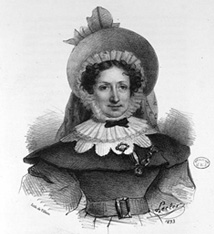
Marie-Anne GILLAIN was born in 1773 in Montreuil, near Versailles.
She was sent to boarding school with the Sisters of the Visitation.
During the Revolution, she took refuge in Etampes, at the home of a relative who was the mother superior of the Hospitalières de l’Hôtel-Dieu.
There she attended the surgeon’s lectures and served for two and a half years, from 1793 to 1796, as a hospital volunteer—that is, as a layperson who volunteered her services to the poor and sick.
In 1797, she returned to Versailles to marry Louis BOIVIN, deputy office manager at the National Domains.
She became pregnant early on, but in 1798, at the age of 25, she was suddenly widowed, left destitute, and with a young daughter to raise.
She then decided to put to use the knowledge she had gained from the surgeon at the Hôtel-Dieu d’Étampes and enrolled in the Midwifery School at the Maternité in 1799.
In 1800, she graduated and left for Versailles to be reunited with her daughter and pursue her career.
In 1801, following the death of her daughter, she obtained permission from Marie-Louise Lachapelle to return to the Maternity Hospice
In 1803, she was appointed chief supervisor of the breastfeeding unit. She held this position for eleven years, until 1814. During this long tenure, she took the opportunity to attend lectures given by her patron, the surgeons at the Maternity Hospital (Baudelocque, then Dubois), and the chief physicians (Andry, and especially Chaussier), from whom she gathered insights and lessons.
In 1812, she wrote and published *A Treatise on the Art of Childbirth*. The work was approved by the Ministry of the Interior, which included it among the textbooks given to graduates of the Maternity School.
In 1814, the position of supervisor that she held was eliminated, and she was dismissed with a gratuity equal to her annual salary, or 360 francs.
Starting in October, she was hired as a storekeeper and steward at the Poissy General Hospital, a position she held until January 1819, when the General Hospital was converted into a prison.
Little is known about this period of her life: Did she continue her obstetric practice despite her new, more administrative duties? Did she do so at the general hospital? Or with a private clientele? In any case, it appears that for a time she received a comfortable annual salary of 1,200 francs—almost as much as the head midwife at the Maternity Hospital.
In 1818, she entered the Paris Medical Society’s competition anonymously, submitting a paper on internal uterine hemorrhages. She was awarded the medal.
On February1, 1819, she joined the Maison Royale de Santé in Paris as chief supervising midwife, with a modest salary of 350 francs per year.
In 1821, an opportunity for promotion arose following the death of Marie-Louise Lachapelle.
According to procedure, the General Council of the Hospices must submit to the Minister of the Interior a list of five female candidates to succeed the renowned midwife.
On November 14, 1821, the Council voted to approve a list with Marie-Anne Boivin at the top; she received 12 out of 12 votes in the first round of voting to select the top candidate.
A month and a half later, the Minister of the Interior endorsed the Council's decision.
But the winner declined the position (or rather, resigned), forcing the board to propose another list. Why the refusal? All contemporary biographers attribute this decision to a public promise Marie-Anne Boivin is said to have made to her former patroness never to replace her, even after her death. If this is true, she kept her word, and another midwife, Madeleine Catherine Legrand, was appointed in 1822.
Marie-Anne Boivin therefore continued to practice at the Maison Royale de Santé, where she amassed a body of observations, publications, and honors.
In 1828, she presented a paper on spontaneous abortions, which was awarded a prize by the Bordeaux Medical Society.
In September 1835, at the age of 62, worn out and exhausted, she retired and urged the hospice board to grant her a pension. Finally, after suffering a first stroke that left her with hemiplegia, she died in May 1841.
In 1902, one of the rooms in the renovated maternity ward was named after Marie-Anne Boivin.
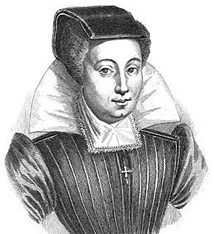
She was born in 1563 on Boulevard Saint-Germain or in Mons to a family of doctors.
In 1594, she married Martin BOURSIER, a master surgeon and student of Ambroise PARÉ.
She finds herself without any means of support when her husband is enlisted in the king's army.
She quickly gained a reputation among the ladies of the court and delivered the queen's children six times.
She is paid 500 crowns for the birth of a boy and 300 for the birth of a girl.
It lost its fame following the death of Marie de Bourbon-Montpensier, wife of Gaston d’Orléans, during the birth of the Grande Mademoiselle.
According to the surgeons who performed the autopsy on the woman who had given birth, her death was attributed to placental debris remaining in the uterus, and Louise Bourgeois was subsequently accused of negligence.
At that time, there were few male obstetricians practicing, and they were trying to gain the upper hand over the midwives' guild.
Louise questions their competence by harshly criticizing the autopsy findings and the skills of the obstetricians; however, her response has the opposite effect of what she intended, as it ends up giving them publicity.
She was the first midwife to write a book on obstetrics, *Various Observations on Infertility, Miscarriage, Fertility, Childbirth, and Diseases of Women and Newborns*, published in 1609.
In this book, she points out that infertility in a couple can be caused by the male partner, even though, like the doctors of that era, she confuses the ability to procreate with sexual vigor.
She identified the role of malnutrition in fetal health, and she was the first to prescribe iron supplements to treat anemia.
She emphasizes the importance of anatomical knowledge for midwives and urges doctors to allow them to attend lectures and dissection sessions.
In 1636, the Parisian midwives submitted a petition to the Faculty of Medicine requesting that Louise Bourgeois be allowed to teach them obstetrics, but their request was denied.
Subsequently, however, one of her students, Marguerite du Tertre de la Marche, was appointed head of the midwives at the Hôtel-Dieu and succeeded in overhauling their training program.
She died on December 20, 1636, on Boulevard Saint-Germain at the age of 73.
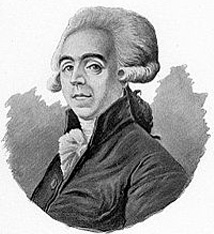
He was born on November 30, 1745, in Heilly, Picardy.
He was the son of Jean Baptiste BAUDELOCQUE, a surgeon, and Anne Marguerite LEVASSEUR. His brothers Félix Honoré (1744–1794) and Jean Baptiste (1749–1800) were both doctors. He was the third of ten children.
It was his father who introduced him to surgery in the countryside of Picardy.
He completed his studies in Paris at the Hôpital de la Charité, where a renowned professor of obstetrics, Solayrès de Renhac (1737–1772), was on staff.
In 1772, following Solayrès’s untimely death at the age of 35, he collected the manuscripts of his lectures and succeeded him as professor of obstetrics at the Hôpital de la Charité. Thanks to Baudelocque, Solayrès’s work was saved from oblivion.
In 1775, at the initiative of Augier du FOT, a surgeon and instructor of childbirth in Soissons, he published—based on manuscripts bequeathed by Solayrès de RENHAC—the first edition of a manual intended for the training of midwives. This work was later republished under his name alone, under the title“Principles on the Art of Childbirth: Questions and Answers for Midwifery Students.” It underwent three reprints during Baudelocque’s lifetime and three more posthumously.
In 1776, following the defense of his dissertation on symphysotomy, titled“An in partu propter angustiam pelvis impossibili, symphysis ossium secanda?,” he was appointed surgeon at the Hôpital de la Charité in Paris and was awarded the title of Master of Surgery by the Paris College of Surgery.
On April 5 or 6, 1777, in Paris, he married Andrée DERULLIER (née de Vulier, de Voulier, de Rullie, or de Rouillier), whose family made models of pregnant women for demonstrations in childbirth classes; she died on January 4, 1787, without children.
In 1781 and 1789, he published the first two editions of his scholarly treatise*The Art of Childbirth* in two volumes. He became famous for his forceps, his practice of cesarean sections, and the invention of the pelvimeter, which measures the external anteroposterior diameter to identify patients who might experience difficulties during childbirth.
On September 14, 1788, in Amiens, he married Marie Catherine Rose Laurent; the couple had five children (three daughters and two sons).
During the French Revolution, the guilds and faculties were abolished. Hospitals lost some of their staff and funding. Baudelocque, however, managed to build a reputation as an obstetrician thanks to a clientele in the city and private obstetrics classes.
In 1794, the former Faculty of Medicine was replaced by the École centrale de Santé de Paris, where he was responsible for teaching courses to medical students and midwives.
In October 1795, the Hospice de la Maternité took in poor women and unwed mothers to assist them during childbirth and provided clinical training for midwives and doctors from the École de Santé.
In addition, this facility also takes in abandoned children.
In 1798, Baudelocque, in addition to his position as professor of obstetrics at the Paris School of Health, became chief surgeon at the Maternity Hospital.
In 1802, the Hospice de la Maternité school was founded, where Baudelocque put his teaching skills to use, employing mannequins to help students practice examinations and obstetric procedures. He emphasized observation over intervention, preferring to let nature take its course and using instruments as little as possible.
Busy with his many responsibilities, he delegated part of his authority to the head midwife of the Maternity Ward, Marie-Louise Lachapelle (1769–1821), who took on part of the training of the midwifery students and was authorized to use forceps on her own in the event of a difficult delivery.
He was involved in a sensational lawsuit brought against him by an obstetrician, Jean François Sacombe, a fierce opponent of cesarean sections and a defender of traditional midwifery practices. Sacombe, who had set himself up as a defender of midwives and accused Baudelocque of infanticide, ultimately lost his case in 1804 and, in the process, any sense of moderation.
In 1806, Napoleon appointed Jean-Louis Baudelocque to the chair of obstetrics, the first chair in a medical specialty in France.
He became the obstetrician to the queens of Spain, Holland, and Naples, as well as to all the ladies of the court.
He had been chosen and selected in advance to deliver the heir awaited by Napoleon and Empress Marie-Louise of Austria. But, struck down by a cerebral hemorrhage, he would not live to see the birth of the King of Rome.
He died on May 2 or 3, 1810, at 16 Rue Jacob in Paris (6th arrondissement), where he lived, at the age of 65.
He was buried in the Vaugirard West Cemetery, then exhumed due to land acquisition for the construction of what is now Boulevard Pasteur.
He was then buried on August 17, 1839, at Père-Lachaise Cemetery (45thdivision).
He was the most famous obstetrician of his time.
A doctor at the Hôpital des Enfants Malades, he would lend his name to the Baudelocque Clinic in 1890.
In 1966, the Port-Royal Maternity Hospital was built. The two facilities merged in 1993 (14th arrondissement of Paris).
There is now a midwifery school on Avenue Denfert-Rochereau that bears her name.
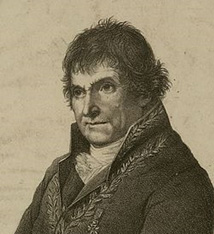
He was born on July 2, 1746, in Dijon, in the parish of Saint Pierre.
His father was a master glazier.
After completing his training at the hospital in Dijon, his mother sent him to Paris to continue his medical studies, and he enrolled at the Royal College of Surgery, where he attended classes regularly from 1765 to 1767 and took anatomy courses taught by Raphaël SABATIER and Jean-Joseph SUE.
At the same time, he was learning the basics of surgery at Lafaye’s clinics and, in the afternoons, at those of Isaac GOURSAUD.
His years of surgical training came to an end in 1768, when he earned the title of Master of Surgery; he then settled in Dijon as a surgeon
He married Jeanne CARRE, the daughter and granddaughter of a master surgeon, on July 27, 1767, in Quetigny, Côte d’Or. Together they had a son, Bernard François Hector (1769–1837).
In 1769, he began teaching a free course in human and comparative anatomy, which was attended by many students for more than ten years.
In 1774, the Estates of Burgundy established a chemistry program with Louis-Bernard GUYTON de MORVEAU as the tenured professor and Hugues MARET and François CHAUSSIER as assistants. Upon MARET’s death in 1786, he was promoted to second professor of chemistry.
In Dijon, his professional qualities earned him the favor of his patients, and his reputation quickly spread beyond Burgundy; he distinguished himself at the Academy of Surgery through several presentations, and as a result, he was awarded the Academy’s Gold Medal at the public session on April 10, 1777.
He received his Doctor of Medicine degree from the University of Besançon on January 14, 1780, and in 1784, he became a corresponding member of the Royal Society of Medicine. That same year, he was admitted to the Academy of Sciences, Arts, and Literature in Dijon, where he became secretary-general following the retirement of Guyton de Morveau.
In 1785, at the request of the Estates of Burgundy, he published a popular guide on the treatment of bites from rabid animals: “Method for Treating Bites from Rabid Animals and Vipers; Followed by a Brief Treatise on the Malignant Pustule” (with Joseph Enaux, 1726–1798).
In 1789, he published a study on the muscles of the human body, in which he proposed a more rational classification than the one taught up to that point: “A Summary Exposition of the Muscles of the Human Body According to the Methodical Classification and Nomenclature Adopted in the Public Anatomy Course at Dijon”; this work was reprinted in 1797.
On December 20, 1789, he read a paper titled “Surgical-Forensic Observations on an Important Point of Criminal Jurisprudence” at the Academy of Dijon, in which he demonstrated the role that physicians could play in informing the judicial system; this work attracted attention, and the following year he launched a course in forensic medicine in Dijon.
On 3 Nivôse, Year III (December 23, 1794), he married Angélique LABOREY in Dijon (Crébillon District); they also had a son, Franck Bernard Simon (1804–1866).
In 1794, Antoine-François Fourcroy was tasked by the National Convention with reorganizing medical education and sought out a prominent figure who could provide him with the details of this reorganization. Claude-Antoine Prieur-Duvernois, from the Côte-d’Or, who headed the Department of Science and the Arts within the Committee of Public Safety, recommended François Chaussier, who thus joined the Committee of Public Instruction: he drafted a report and a proposed decree, which he read from the rostrum of the Convention on 7 Frimaire, Year III (November 27, 1794); In it, he proposed the creation of a single “Central School of Health” in Paris; the members of the Convention, who were largely in favor of decentralization, called for the creation of other similar schools in Montpellier and Strasbourg, and it was on this basis that the report was adopted on the 14th of Frimaire (December 4).
Chaussier returned to Dijon, where he resumed his lectures and studies as well as the duties that had been entrusted to him: he had been appointed physician of the Dijon Hospices in April 1793 and Prison Surgeon; he did not remain there long, however, as he was recalled to Paris to occupy the chair of anatomy and physiology at the School of Health. Chaussier was, in the words of Joseph-Henri Réveillé-Parise, the most famous professor of physiology at the École de Paris: he argued that vitalism was the foundation of all studies in physiology.
A decree dated 7 Vendémiaire, Year III (September 28, 1794) officially established the École Centrale des Travaux Publics, which would later become the École Polytechnique, the Board of Directors proposed, less than a month after the school opened, to establish an infirmary there and to appoint a “health officer” (the revolutionary term for doctors) to treat sick students and also to give lessons on “the art of preventing and alleviating diseases.” The roster of École Polytechnique staff for the following year lists him as an assistant to Claude Louis Berthollet, “simultaneously responsible for the courses in Zootechnics and Public Health, and School Physician”: in fact, he taught Berthollet’s course during the latter’s absence in Italy in 1796–1797. After the formalization of chemistry instruction, Chaussier appears to have abandoned teaching this science and confined himself almost entirely to his duties as a physician.
In 1799, *Les tables synoptiques* was published to great acclaim. It provides a summary of the physiology, pathology, and treatment of the various anatomical systems of the human body.
On May 9, 1804, he was appointed Physician of the Maternity Hospices and entrusted with the chairmanship of the medical examination boards for the examinations to become a Public Health Officer, Pharmacist, and Midwife for the district of the Paris Faculty of Medicine.
He was a member of the commission appointed by the Minister of the Interior in October 1810 to study “secret remedies”; there he worked alongside André Marie Constant Duméril, Jean-Joseph Menuret, and Nicolas Deyeux.
In 1815, after the fall of the First Empire, he was replaced as physician at the École Polytechnique, but he retained his chair at the Faculty until November 21, 1822, when the Restoration altered the Faculty’s organization: he was appointed honorary professor and his chair was revoked. He was deeply embittered by this, and the next day, he suffered a stroke that temporarily left him unable to speak or walk. He recovered, however, though he remained hemiplegic—a condition that did not prevent him from continuing his work at the Maternity Hospital.
On May 6, 1823, he was admitted tothe Academy of Sciences.
Between 1824 and 1827, he published several works on forensic medicine: “Forensic Manual of Poisons, Preceded by Considerations on Poisoning”14, “Collection of Papers, Consultations, and Reports on Various Topics in Forensic Medicine”15, “A Forensic Medical Treatise on the Viability of the Newborn, Presented toHis Excellency the Keeper of the Seals, Minister of Justice”16
François Chaussier died at his home in Paris on June 19, 1828, at the age of 81, from a stroke.
He was buried at Père-Lachaise Cemetery (18th division) on June 21: Nicolas-Philibert Adelon delivered a speech on behalf of the Academy; Marie-Alexandre Désormaux, representing the Faculty, did the same; and Duméril, on behalf of the Royal Academy of Sciences, read a lengthy eulogy.
Thesecond son, Franck CHAUSSIER, followed in his father's footsteps and defended his doctoral dissertation in 1827 in Montpellier.
He is a French physician, a professor at the Paris Faculty of Medicine, and a member of the Royal Academy of Medicine and the Academy of Sciences.
Chaussier was the principal editor of the articles on pharmacy inthe *Encyclopédie méthodique*13.
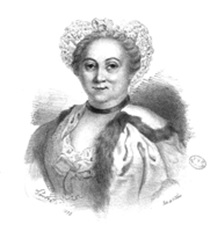
She was born in 1712 in Clermont-Ferrand into a family of doctors.
She first studied for three years under Anne BAIRSIN, a midwife.
On September 26, 1739, she received her diploma and shortly thereafter became a licensed midwife.
She worked as a head midwife at Châtelet in Paris for sixteen years.
In 1752, to combine theory with practice, she published a book titled *A Summary of the Art of Childbirth*.
In 1754, she returned to Auvergne and began giving free lessons.
In 1758, she designed her famous demonstration “machine” (made of wood, cardboard, fabric, and cotton), which was approved on December1 by the Academy of Surgery.
During the two-month training program, the students were encouraged to practice on the mannequin.
She died on April 16, 1794, at the age of 79 in Bordeaux, in poverty and solitude, with her niece and her husband absent. There is a Rue Angélique du Coudray in Thorigné-Fouillard and also a Rue Madame-du-Coudray in Clermont-Ferrand, her hometown. The maternity ward at the hospital in Melun (77) also bears her name.