WELCOME TO THE FACULTY

(OR WELCOME BACK!)

Registration will be conducted primarily online.

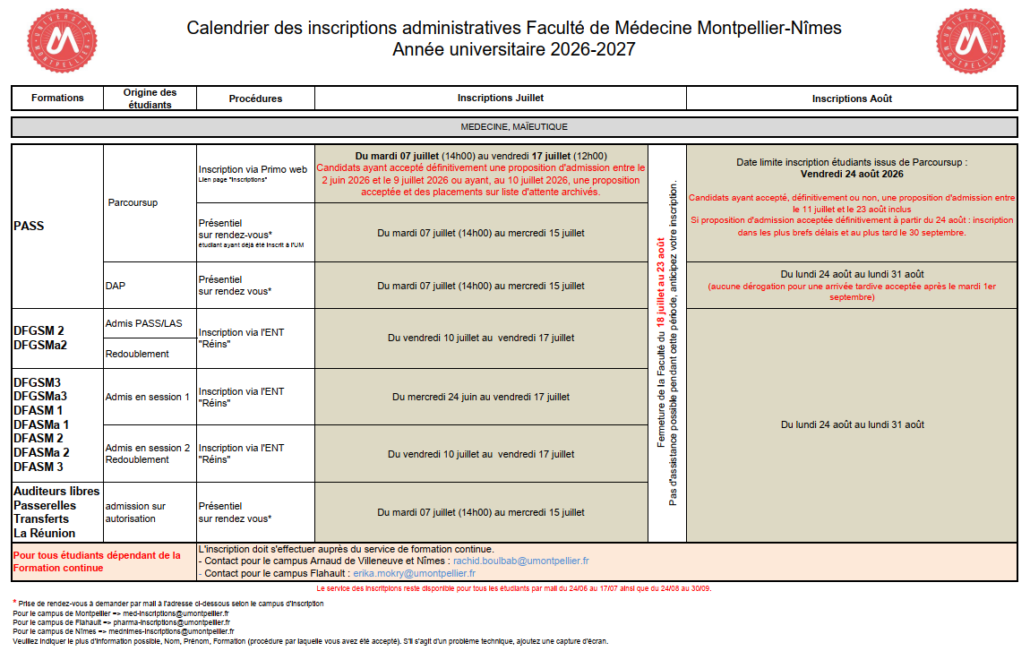
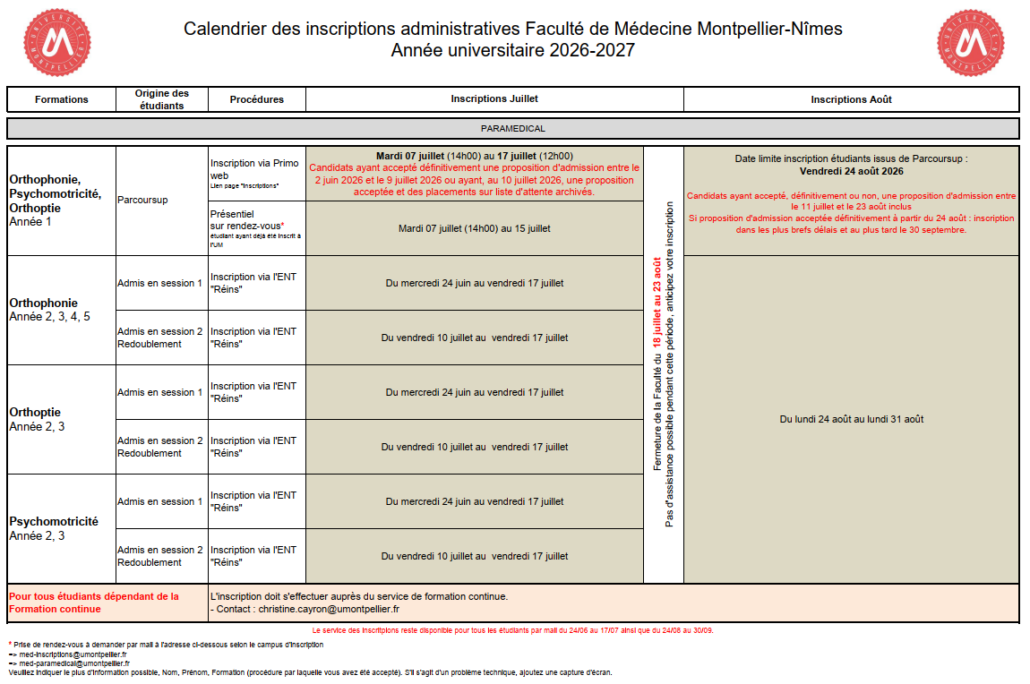
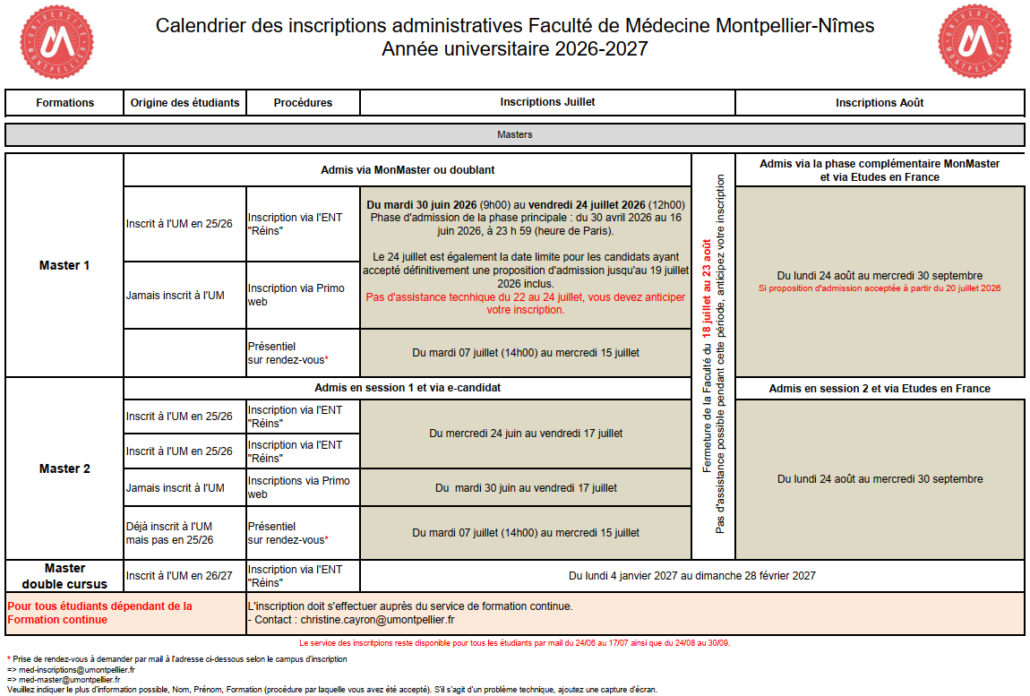
Here you will find the dates for the application periods for the various programs and academic years, as well as the different steps in the application process.

REGISTRATION PERIODS

Click on the image to enlarge it

CLAIMS REGISTRATION

Before filing a complaint, you should contact the registrar’s office at your school, as they may be able to provide a quick and simple answer.
Only if that is not the case should you fill out the form “ Complaint ” form, detailing the steps you have already taken.
You will receive an acknowledgment of receipt at the email address you provided on the form.

WELCOME TO PASS

at the Montpellier-Nîmes School of Medicine!
Arnaud de Villeneuve Campus, Flahault Campus, and Nîmes Campus

Find all the information you need about enrolling in the PASS (SpecificHealthCarePathway) program in Montpellier and Nîmes here.

If, with just a few days left before the Parcoursup application deadline, you're still undecided between PASS and LAS, you can check out our dedicated page here.

⚠️ Summer closure: July 18 through August 23, 2026
→ No case processing or assistance will be available during this period

Parcoursup

  • July 7, 2026 (2:00 p.m.) → July 17, 2026 (12:00 p.m.)
    Admissions confirmed between June 2 and July 16
  • August 24, 2026 (2:00 p.m.) → August 31, 2026
    Admissions confirmed between July 11 and August 17

✔ Includes candidates in the supplementary phase

DAP Procedure

  • Registration by appointment only
  • In-person attendance required
  • Dates: August 24, 2026 → August 31, 2026

The Registrar's Office will send you information about the procedure.

No registrations or late arrival exemptions will be accepted after August 31.

Back-to-School Meeting : Monday, August 31, for all three campuses at 8:30 a.m. Attendance is mandatory.

This meeting will be open to registered participants only

Classes begin : Tuesday, September 1

The campus, ADV teaching site, Flahault, or Nîmes

You have been admitted through Parcoursup to the Nîmes, you will be automatically enrolled at the Nîmes CarémeauCampus.

You have been admitted through Parcoursup to the Montpellier, you will be automatically enrolled at the campus where the program is offered, namely:

Flahault Campus for the following tracks: Mechanical Engineering, Physics/Chemistry, Psychology, Life and Earth Sciences

ADV Campus for the following tracks: Chemistry, Law, Mathematics, MIASHS, Physics, Economics, EEA.

Some of these documents are forms that can be filled out online. If your software version does not allow you to fill them out, please print them, fill them out by hand, and scan them.

Required documents for applying to the Medicine, Midwifery, Dentistry, and Pharmacy (MMOP) program

Information documents to read carefully

To request a tuition refund due to a change in circumstances (CROUS or government scholarship recipient, apprentice, ward of the state), click here.

To request cancellation of your registration (deadline: October 1), click here.

Contact information for the various registration offices by campus

For any inquiries, please provide as much information as possible so we can resolve your issue as quickly as possible: Last Name, First Name, Parcoursup ID (authorization attached) or other admission application, and a full screenshot of the error.

Arnaud de Villeneuve Campus
641 Doyen Gaston Giraud Avenue
34090 Montpellier
Contact

Flahault Campus
15 Charles Flahault Avenue
34093 Montpellier Cedex 5
Contact

Nîmes Campus
186 Chemin du Carreau de Lanes
30908 Nîmes
Contact

Online payment required: €178

✔️ International students from outside the European Union

For the 2026–2027 academic year, the Board of Trustees of the University of Montpellier voted to extend the partial exemption from differential tuition fees.

➡️ Tuition fees are now the same as those for domestic and European students: €178

✔️ Scholarship recipients

Students receiving scholarships are exempt from tuition fees, provided they submit:

  • A conditional grant notification from CROUS
    (French government grant)

REGISTRATION PROCEDURE

On some Fridays before 10 a.m., updates to the registration software may cause the registration applications to be temporarily unavailable.
Please wait and try again after 10 a.m.

  • Step 1: Student Life and Campus Fee

    Before registering, you must pay the CVEC fee (€105).

    Submit your certificate (required, whether you are exempt or not)

  • Step 2: Registration

    1. First-time enrollment at the University of Montpellier (UM)

    If you are enrolling at the University of Montpellier for the first time 👉 👉Go toPrimoweb.

    ⚠️ Important: After confirming your application on Parcoursup, you must wait at least 24 hours (longer if it falls on a weekend or holiday) before you can access Primoweb.

    By the end of this step:

    • Be sure to write down your student ID number.
    • Once this number is assigned, your pre-registration for your chosen campus is complete.
    • Your registration will be finalized only after we receive the confirmation email regarding your supporting documents (Step 5).

    2. Re-enrollment (students already enrolled at UM)

    ✔️ You have an active ENT account for the 2025–2026 school year:

    Register at:
    ➡️ Your UM IT account (ENT), "Re-registration" tab .

    ✔️ You were previously enrolled at UM or canceled your enrollment in the PASS program, and do not have an active ENT for the 2025/2026 academic year:

    You should contact the registration office on your campus:

    📧 Email subject:
    Registration for the PASS program (option XXXX) – student already enrolled at UM

    📌 Documents and information to provide:

    • Parcoursup Certificate
    • First and last name
    • UM Student ID Number
    • Detailed explanations of your situation
  • 3. Digital Workspace (ENT)

    The digital learning platformgives you access to all information related to your program (emails, schedule, courses, etc.)

    After completing your registration, you will receive an email (at the personal email address you provided during registration) to activate your ENT account.

    The link will be sent within 24 hours. If you still haven’t received it after 24 hours (be sure to check your spam and junk folders), you can follow the Activation Procedure or Activation Issues

    We strongly recommend that you use your institutional email address when communicating with the various department offices.
  • 4. Required supporting documents

    To complete your registration, you must submit all supporting documents in your ENT under the PJWeb tab

     "The list of required documents and the forms you need to download for registration" can be found above under "Registration Documents"

    You can upload them in PDF or JPEG format only from a computer (Please note: photos must be in JPEG format only). Follow the PJweb guide! 

  • 5. Confirmation of enrollment by the Registrar’s Office

    Once your application has been approved by the Registrar's Office, you will receive an email, and you will then be able to print your enrollment certificate from your digital learning platform.

    Verification may take a few days, but your registration is already active.

    However, this step is mandatory, and all documents must be submitted and approved in order for you to receive your enrollment certificate.

    If, as of September 30, your application is still incomplete despite our reminders, we will cancel your registration in accordance with Decision No. 2025-721-UM

  • 6. Student ID or Multi-Service Card (CMS)

    The Multi-Services Card is non-transferable and personal; students must pick it up at the Registrar’s Office after verifying their identity by presenting a valid ID starting on July 7 and 24 hours after receiving the confirmation email of the supporting documents.

    Students enrolled at the Arnaud de Villeneuve campus: Registration Office #21, ground floor, undergraduate and graduate admissions.

    Students enrolled at the Flahault campus: The Registrar’s Office will contact you before the start of the school year to schedule a time for you to pick it up.

    Students enrolled at the Nîmes campus: It will be distributed at the back-to-school meeting.

If you are experiencing a problem, please contact us using the form below and provide as much information as possible about the issue.

Contact the Nîmes campus

Contact the Fahault Campus

Contact the ADV Campus

STUDENTS WITH DISABILITIES

Do you have a disability? Accommodations are available for you. To request them, click the link below!

COLLEGE SPORTS

Did you know? The University offers access to a wide range of sports through SUAPS! To learn more about SUAPS and how to sign up for these activities, click the link below!

Campus Overview

The courses offered at all three campuses are exactly the same and are broadcast live in the lecture halls at each location. Learn more about our three campuses in Montpellier and Nîmes below.

FLAHAULT

Montpellier

The Flahault Campus, part of the School of Pharmacy: a welcoming campus located in the heart of the university district, just a stone’s throw from the CROUS student housing and all amenities.

ContactDirections

ARNAUD DE VILLENEUVE

Montpellier

The Arnaud de Villeneuve Campus, part of the Faculty of Medicine, Montpellier campus: a modern campus located near the Occitanie tram stop, close to the Veyrassi sports facilities.

ContactDirections

CARÉMEAU

Nîmes

The Nîmes Carémeau Campus, part of the Faculty of Medicine’s Nîmes campus: a welcoming campus, a tree-lined work environment, and a city steeped in history!

ContactDirections

CLAIMS REGISTRATION

Before filing a complaint, you should contact the registrar’s office at your school, as they may be able to provide a quick and simple answer.
Only if that is not the case should you fill out the form “ Complaint ” form, detailing the steps you have already taken.
You will receive an acknowledgment of receipt at the email address you provided on the form.

TUTORING

FIRST YEAR OF HEALTH STUDIES

The University of Montpellier’s Health Sciences Tutoring Program brings together three free student organizations to help students succeed in their first year of health sciences studies. To this end, student “tutors” based at three locations (Nîmes Medicine, Montpellier Medicine, and Pharmacy) regularly offer review sessions to help you best prepare for the demands of your first year. On this page, you’ll find a detailed overview of the tutoring associations, their activities, and the pre-semester workshop taking place from August 19 to 31!
If you’d like to sign up, visit the ASTM, TSN, and ATP tutoring pages.

3 ORGANIZATIONS DEDICATED TO YOUR SUCCESS!

ATP

Montpellier – Flahaut

The ATP, based at the Faculty of Pharmacy, has been working with first-year students for years to support and assist them by ensuring equal opportunities and high-quality academic guidance. It is made up ofsecond-,third-, andfourth-year pharmacy students. We are responsible for PASS students at our campus, as well as LAS students from the Faculties of Law, Economics, and Sports Science (STAPS) in Montpellier, and law students from the Faculty of Perpignan and its branch in Narbonne.

ATSM

Montpellier – ADV

Located on the Arnaud de Villeneuve campus (new School of Medicine), the Montpellier Health Tutoring Association brings together students from 2, 2nd, 3, and4th-year students in medicine, midwifery, and dentistry. Committed to both equal opportunities in academic support and student well-being, we are responsible for the PASS programs at our campus, as well as the LAS programs in the Faculty of Sciences (SVSE and PCSI), the Paul Valéry campus (CMAM, Classical Literature, EPF, Psychology, and MIASHS), and the Biology branch in Mayotte.

TSN Association

TSN

Nîmes – Carémeau

The TSN is the tutoring association at the Montpellier Faculty of Medicine, operating out of the Nîmes branch. We bring togethersecond- andthird-year medical and midwifery students. Our goal is to maximize equal opportunity in access to health studies and to offer students academic support as well as well-being support. We will support PASS students at our location, as well as LAS students from the Nîmes Faculty (Psychology, Biology and Environment, and Law) and the Perpignan Faculty (Mathematics and Life and Earth Sciences).

Montpellier Association of Pharmacy Tutors – ATP

ATP_UM

@atp_um

Health Tutoring in Montpellier

tutoring-santemtp

@tutoratsantemtp

Health Tutoring in Nîmes

Health Tutoring in Nîmes

@TutoSantéNîmes

MENTORING ACTIVITIES THROUGHOUT THE YEAR

  • Weekly sessions

    Every week, we hold sessions in all subjects in coordination with the teaching staff, using sample multiple-choice questions to help students prepare for the exam

  • Assessments and Practice Exams

    Weekly assessments and one practice exam per semester to help students practice under realistic conditions

  • Accessibility Tutorial

    A Disability Tutoring Service offering adapted sessions and exams

  • Orientation

    Guidance and support by working closely with the administration throughout this year of reform

  • Sponsorship

    A mentoring program with an upperclassman in a healthcare program

  • Well-being

    Wellness-focused activities (sports, relaxation, social time, etc.) to support any student who feels the need during a demanding academic year

  • Online forum

    An online forum and in-person drop-in sessions to answer questions

  • Free of charge

    All of this is completely free of charge to promote maximum equal opportunity in accessing health studies.

THE BACK-TO-SCHOOL WORKSHOP

Considered essential by nearly 96% of our students, the pre-semester orientation is organized by the academic advising offices in August to help incoming PASS students start the semester with confidence!

  • It will take place in late August 2023 (dates to be announced later).
  • The objectives of this internship are as follows:
    • Get a head start on studying the most important courses of the semester
    • Practice with sample multiple-choice tests to quickly get used to the format of the exam.
    • Identify a study method suitable for all first-semester courses to ensure effective learning from the very start of lectures.
    • In a year of transition, find out how the reform will affect your academic path: access to different programs, Bachelor’s degrees in healthcare, etc.
    • Get acquainted with student life at the university by learning about key dates for the year, student organizations, and available work opportunities.
  • To help you get ready for the new school year, we’ll be posting tutorials to help you understand how the platform we’ll be using works, as well as a detailed schedule for the summer workshop. Feel free to sign up using the form and follow us on social media!

CHECK OUT ALL THE OTHER CLUBS AND ORGANIZATIONS IN THE FACULTY, TOO!

Studying health sciences also gives you the chance to be part of a very active student life!

Discover all the other student organizations in the Faculty now by clicking the button below!

MEDICINE PROGRAM

Undergraduate and graduate programs

Find all the information you need about enrolling in the medical program (from DFSGM2 to DFASM3) here.

IMPORTANT

REGISTRATION DATES

  • DFGSM2
    • Admitted to PASS/LAS/MMOP (non-EEA students):  July 11–22
    • Repeat performances: July 11–22
  • DFGSM3
    • Admitted to Session 1: June 25–July 22
    • Students admitted to Session 2 / Repeaters: July 11–22
  • DFASM 1, 2, and 3
    • Admitted to Session 1: June 25–July 22
    • Students admitted to Session 2 / Repeaters: July 11–22
  • An additional registration period will be open after the college closes from August 21 (2:00 p.m.) to August 31
  • Transfer students, students from French overseas departments and territories, and auditors are eligible to register:
    • By appointment between July 4 (2:00 p.m.) and July 18, or between August 21 (2:00 p.m.) and August 31

START DATE

DFGSM2

Back-to-school meeting:

Start of classes: (see ENT).

DFGSM3

Back-to-school meeting:

Start of classes: (see ENT).

DFASM1,2,3: Classes and internship begin on September 1,

REGISTRATION DOCUMENTS

Some of these documents are forms that can be filled out online. If your software version does not allow you to fill them out, please print them, fill them out by hand, and scan them.

To request a tuition refund due to a change in circumstances (CROUS or government scholarship recipient, apprentice, ward of the state), click here.

To request cancellation of your registration (deadline: October 1), click here.

APPLICATION PROCESS – MEDICINE

  • 1. Payment of the CVEC

    Before registering or re-registering, you must pay the CVEC fee (€105).

    Submit your certificate (required, whether you are exempt or not)

  • 2. Online registration via the digital campus portal under the "Re-registration" tab

    If you are already a student at UM for the 2024–25 academic year, you will need to re-enroll.

    For those eligible to register via a Gateway, transfer, or DOM-TOM transfer, the procedure will be sent to you by the Registrar's Office.

    For non-EU international students, the UM Board of Governors has approved the extension of the partial exemption from differentiated tuition fees for the 2025–2026 academic year.

    The exemption brings tuition fees in line with those paid by domestic and EU students: €178 for undergraduate programs and €254 for graduate programs.

  • 3. Digital Workspace (ENT) for new students

    The digital learning platformgives you access to all information related to your program (emails, schedule, courses, etc.)

    After completing your registration, you will receive an email (at the personal email address you provided during registration) to activate your ENT account.

    The link will be sent within 24 hours. If you still haven’t received it after 24 hours (be sure to check your spam and junk folders), you can follow the Activation Procedure or Activation Issues

    We strongly recommend that you use your institutional email address when communicating with the various department offices.
  • 4. Uploading Supporting Documents to PJweb

    To complete your registration, you must upload all supporting documents to your digital workspace under the "PJWeb" tab

     "List of documents to include with your application" above in "Application Documents"

    You can upload them in PDF or JPEG format only from a computer (please note that photos must be in JPEG format only). Follow the PJweb guide! 

  • 5. Confirmation of enrollment by the Registrar’s Office

    Once your application has been approved by the Registrar's Office, you will receive an email, and you will then be able to print your enrollment certificate from your digital learning platform.

    Verification may take a few days, but your registration is already active.

    However, this step is mandatory, and all documents must be submitted and approved in order for you to receive your enrollment certificate.

    If, as of September 30, your application is still incomplete despite our reminders, we will cancel your registration in accordance with Decision No. 2025-721-UM


  • 6. Updating Your Student ID Card

    At the back-to-school meeting, you will be given a sticker for the current school year so you can update it.

    You can also request it from your promotion manager.

Contact the Montpellier office

Contact the Nîmes office

STUDENTS WITH DISABILITIES

Do you have a disability? Accommodations are available for you. To request them, click the link below!

CHECK OUT ALL THE STUDENT ORGANIZATIONS AT THE FACULTY!

Studying health sciences also gives you the chance to be part of a very active student life!

Discover all the student organizations at the Faculty now by clicking the button below!

CLAIMS REGISTRATION

Before filing a complaint, you should contact the registrar’s office at your school, as they may be able to provide a quick and simple answer.
Only if that is not the case should you fill out the form “ Complaint ” form, detailing the steps you have already taken.
You will receive an acknowledgment of receipt at the email address you provided on the form.

BOARDING SCHOOL

Postgraduate medical studies

Find all the information you need about graduate program applications here.

CLAIMS REGISTRATION

Before filing a complaint, you should contact the registrar’s office at your school, as they may be able to provide a quick and simple answer.
Only if that is not the case should you fill out the form “ Complaint ” form, detailing the steps you have already taken.
You will receive an acknowledgment of receipt at the email address you provided on the form.

MAIEUTIC TRACK

Find all the information you need about enrolling in the midwifery program (from DFSGMa2 to DFASMa2) here.

IMPORTANT

REGISTRATION DATES

  • DFGSMa 2
    • Admitted to PASS/LAS/MMOP (non-EEA students): July 11–22
    • Repeat performances: July 11–22
  • DFGSMa 3
    • Admitted to Session 1: June 25–July 22
    • Students admitted to Session 2 / Repeaters: July 11–22
  • DFASMa 1,2

    • Admitted to Session 1: June 25–July 22
    • Students admitted to Session 2 / Repeaters: July 11–22
  • An additional registration period will be open after the school closes, from August 21 to 31

BACK

Maieutics Montpellier

Back-to-school meeting: Monday, September 1, in the morning

Classes begin: Monday, September 1, in the afternoon

Maieutics Nîmes

Back-to-School Meeting: DFGSMa3 and DFASMa1, Nîmes

Monday, September 1: Morning and start of classes in the afternoon

Back-to-School Meeting: DGSMa2 and DFASMa2 Nîmes

Monday, September 1, in the afternoon; classes begin on September 2

REGISTRATION DOCUMENTS

Some of these documents are forms that can be filled out online. If your software version does not allow you to fill them out, please print them, fill them out by hand, and then scan them.

To request a tuition refund due to a change in circumstances (CROUS or government scholarship recipient, apprentice, ward of the state), click here.

To request cancellation of your registration (deadline: October 1), click here.

REGISTRATION PROCEDURE – MAIEUTICS

  • 1. Payment of the CVEC

    Before registering or re-registering, you must pay the CVEC €105

    Submit your certificate (required, whether you are exempt or not)

  • 2. Registration

    If you are already a student at UM for the 2024–25 academic year, you will need to re-enroll.

    • Your UM IT Account (ENT), on the "Re-enrollment" tile.
    • Online payment is required: €178for the first cycle and €254for the second cycle.

    For those eligible to register via a Gateway, transfer, or DOM-TOM transfer, the procedure will be sent to you by the Registrar's Office.

    For non-EU international students, the UM Board of Governors has approved the extension of the partial exemption from differentiated tuition fees for the 2025–2026 academic year.

    The exemption brings tuition fees in line with those paid by domestic and EU students: €178 for undergraduate programs and €254 for graduate programs.

  • 2. Digital Workspace (ENT) for new students

    The digital learning platformgives you access to all information related to your program (emails, schedule, courses, etc.)

    After completing your registration, you will receive an email (at the personal email address you provided during registration) to activate your ENT account.

    The link will be sent within 24 hours. If you still haven’t received it after 24 hours (be sure to check your spam and junk folders), you can follow the Activation Procedure or Activation Issues

    We strongly recommend that you use your institutional email address when communicating with the various department offices.
  • 4. Uploading Supporting Documents to PJweb

    To complete your registration, you must upload all supporting documents to your digital workspace under the "PJWeb" tab

     "List of documents to include with your application" above in "Application Documents"

    You can upload them in PDF or JPEG format only from a computer (please note that photos must be in JPEG format only). Follow the PJweb guide! 

  • 5. Confirmation of enrollment by the Registrar’s Office

    Once your application has been approved by the Registrar's Office, you will receive an email, and you will then be able to print your enrollment certificate from your digital learning platform.

    Verification may take a few days, but your registration is already active.

    However, this step is mandatory, and all documents must be submitted and approved in order for you to receive your enrollment certificate.

    If, as of September 30, your application is still incomplete despite our reminders, we will cancel your registration in accordance with Decision No. 2025-721-UM

  • 6. Student ID

    At the back-to-school meeting, you will be given a sticker for the current school year so you can update it.

    You can also request it from your promotion manager.


Contact the Nîmes office

Contact the Montpellier office

COLLEGE SPORTS

Did you know? The University offers access to a wide range of sports through SUAPS! To learn more about SUAPS and how to sign up for these activities, click the link below!

STUDENTS WITH DISABILITIES

Do you have a disability? Accommodations are available for you. To request them, click the link below!

CHECK OUT ALL THE STUDENT ORGANIZATIONS AT THE FACULTY!

Studying health sciences also gives you the chance to be part of a very active student life!

Discover all the student organizations at the Faculty now by clicking the button below!

CLAIMS REGISTRATION

Before filing a complaint, you should contact the registrar’s office at your school, as they may be able to provide a quick and simple answer.
Only if that is not the case should you fill out the form “ Complaint ” form, detailing the steps you have already taken.
You will receive an acknowledgment of receipt at the email address you provided on the form.

PARAMEDICAL PROGRAMS

Speech Therapy, Orthoptics, Psychomotor Therapy

Find all the information about registration here.

IMPORTANT

REGISTRATION DATES

  • Speech therapy, Orthoptics, Psychomotor Therapy, Year 1 :
    • From July 4 (starting at 2 p.m.) to July 18 July
  • Speech-Language Pathology (Years 2, 3, 4, and 5) and Orthoptics (Years 2 and 3)
    • Admitted for Session 1: June 25–July 18
    • Students admitted to Session 2 / Repeaters: July 15–18
  • Psychomotor Skills 2,3
    • Admitted for Session 1: June 25–July 18
    • Students admitted to Session 2 / Repeaters: July 15–18

REGISTRATION DOCUMENTS

Some of these documents are forms that can be filled out online. If your software version does not allow you to fill them out, please print them, fill them out by hand, and scan them.

To request a tuition refund due to a change in circumstances (CROUS or government scholarship recipient, apprentice, ward of the state), click here.

To request cancellation of your registration (deadline: October 1), click here.

BACK

Back-to-school meeting for all programs on September 1

Classes begin for all programs on September 1

REGISTRATION PROCEDURE – PARAMEDICAL

  • 1. Payment of the CVEC

    Before registering or re-registering, you must pay the CVEC fee (€105).

    Submit your certificate (required, whether you are exempt or not)

  • 2. Registration

    First-Year Registration

    => You are enrolling at the University of Montpellier for the first time =>  Primoweb

    (Please note: Once you have confirmed your preferences on Parcoursup, you must wait 24 hours—or longer if it is a holiday or weekend—before you can access Primoweb.)

    At the end of this step, be sure to note down your student ID number (once you have been assigned a student ID number, your pre-registration will be complete. Your registration will be finalized after you receive the email confirming your supporting documents, Step 5).

    => You have previously been enrolled at the University of Montpellier.

    You should contact the registration office at your campus: contact the paramedical office

    (Email subject: Registration for XXXX, student already enrolled at UM. Please be sure to include your Parcoursup confirmation, last name, first name, and UM student ID number, along with any necessary explanations)

    Re-enrollment for Upper-Division Students

    You are about to re-enroll.

    For non-EU international students, the UM Board of Governors has approved the extension of the partial exemption from differentiated tuition fees for the 2025–2026 academic year.

    The exemption brings tuition fees in line with those paid by domestic and EU students:

    Speech therapy: €563

    Orthoptist: €345

    Psychomotor therapy: €1,376

  • 3. Verification of your online account (ENT) for new registrants

    The digital learning platformgives you access to all information related to your program (emails, schedule, courses, etc.)

    After completing your registration, you will receive an email (at the personal email address you provided during registration) to activate your ENT account.

    The link will be sent within 24 hours. If you still haven’t received it after 24 hours (be sure to check your spam and junk folders), you can follow the Activation Procedure or Activation Issues

    We strongly recommend that you use your institutional email address when communicating with the various department offices.
  • 4. Uploading Supporting Documents to PJweb

    To complete your registration, you must upload all supporting documents to your digital workspace under the "PJWeb" tab

     "List of documents to include with your application" above in "Application Documents"

    You can upload them in PDF or JPEG format only from a computer (please note that photos must be in JPEG format only). Follow the PJweb guide! 

  • 5. Confirmation of enrollment by the Registrar’s Office

    Once your application has been approved by the Registrar's Office, you will receive an email, and you will then be able to print your enrollment certificate from your digital learning platform.

    Verification may take a few days, but your registration is already active.

    However, this step is mandatory, and all documents must be submitted and approved in order for you to receive your enrollment certificate.

    If, as of September 30, your application is still incomplete despite our reminders, we will cancel your registration in accordance with Decision No. 2025-721-UM

  • 6. Issuance of your student ID card

    At the back-to-school meeting, you will be given a sticker for the current school year so you can update it.

    You can also request it from your promotion manager.


Contact us!

STUDENTS WITH DISABILITIES

Do you have a disability? Accommodations are available for you. To request them, click the link below!

COLLEGE SPORTS

Did you know? The University offers access to a wide range of sports through SUAPS! To learn more about SUAPS and how to sign up for these activities, click the link below!

CHECK OUT ALL THE STUDENT ORGANIZATIONS AT THE FACULTY!

Studying health sciences also gives you the chance to be part of a very active student life!

Discover all the student organizations at the Faculty now by clicking the button below!

CLAIMS REGISTRATION

Before filing a complaint, you should contact the registrar’s office at your school, as they may be able to provide a quick and simple answer.
Only if that is not the case should you fill out the form “ Complaint ” form, detailing the steps you have already taken.
You will receive an acknowledgment of receipt at the email address you provided on the form.

DU-DIU

University and Inter-University Degrees

Find all the information you need about registering for university diplomas (DU) and inter-university diplomas (DIU) here.

CLAIMS REGISTRATION

Before filing a complaint, you should contact the registrar’s office at your school, as they may be able to provide a quick and simple answer.
Only if that is not the case should you fill out the form “ Complaint ” form, detailing the steps you have already taken.
You will receive an acknowledgment of receipt at the email address you provided on the form.

WELCOME TO THE MASTER'S PROGRAM

HEALTH AND BIOLOGY-HEALTH

Find all the information you need about applying to the Master’s programs in Health and Biology-Health offered by the Faculty of Medicine here

IMPORTANT

REGISTRATION DATES

  • Master's Degree (Year 1)
    • Admitted via MonMaster: July 1–24 (The faculty will be closed for summer break from July 23 through August 20; no technical support will be available during this time. Please plan ahead, or we will respond as soon as possible once we reopen.)
    • For those who have definitively accepted an offer of admission between July 16 and August 26 (inclusive): August 19–31
  • Master's Degree (Year 2)
    • Already enrolled at UM for the 2024–2025 academic year: June 25–July 22
    • Never enrolled at UM: July 4–July 22
    • For those accepted after July 16: August 19–31

APPLICATION PROCESS – MASTER'S PROGRAMS

  • 1. Payment of the CVEC

    Before registering, you must pay the CVEC fee (€105).

    Submit your certificate (required, whether you are exempt or not)

  • 2. Administrative registration

    • If you are enrolling at the University of Montpellier for the first time, you must register on Primoweb .
    • If you are enrolled at UM for the 2024–25 academic year, you can register via your digital workspace by clicking on the " Re-enrollment" tile.
    • You were previously enrolled at UM but do not have an active ENT account for the 2024–25 academic year: you must contact us to schedule an appointment to register in person (please provide your last name, first name, and Master’s program title).
    • Students enrolled in the first year of the Master’s program who are moving on to the second year after being accepted into ecandiat => registration is possible after the decision is made (Day 1) via “re-registration” in the digital campus platform: between July 8, 2024, and July 20, 2024

    The tuition fee for the master’s program is 254

    For non-EU international students, the UM Board of Governors has approved the extension of the partial exemption from differentiated tuition fees for the 2025–2026 academic year.

    The exemption brings tuition fees in line with those paid by domestic and EU students: €254

  • 3. Digital Workspace (ENT) for new students

    The digital learning platformgives you access to all information related to your program (emails, schedule, courses, etc.)

    After completing your registration, you will receive an email (at the personal email address you provided during registration) to activate your ENT account.

    The link will be sent within 24 hours. If you still haven’t received it after 24 hours (be sure to check your spam and junk folders), you can follow the Activation Procedure or Activation Issues

    We strongly recommend that you use your institutional email address when communicating with the various department offices.
  • 4. Uploading Supporting Documents to PJweb

    To confirm your registration, you will then need to upload all supporting documents to PJweb via your digital workspace.

     “List of required supporting documents” above in Important Documents

    You can upload them in PDF or JPEG format only from a computer. Follow the PJweb guide! 

  • 5. Confirmation of enrollment by the Registrar’s Office

    Once your application has been approved by the Registrar's Office, you will receive an email, and you will then be able to print your enrollment certificate from your digital learning platform.

    Verification may take a few days, but your registration is already active.

    However, this step is mandatory, and all documents must be submitted and approved in order for you to receive your enrollment certificate.

    If, as of September 30, your application is still incomplete despite our reminders, we will cancel your registration in accordance with Decision No. 2025-721-UM


  • 6. Student ID

    The Multi-Service Card is non-transferable and personal; students must pick it up at the Registrar’s Office after verifying their identity by presenting a valid ID starting July 7, 24 hours after receiving the email confirming that their supporting documents have been approved .

Contact Form

STUDENTS WITH DISABILITIES

Do you have a disability? Accommodations are available for you. To request them, click the link below!

COLLEGE SPORTS

Did you know? The University offers access to a wide range of sports through SUAPS! To learn more about SUAPS and how to sign up for these activities, click the link below!

Before filing a complaint, you should contact the registrar’s office at your school, as they may be able to provide a quick and simple answer.
Only if that is not the case should you fill out the form “ Complaint ” form, detailing the steps you have already taken.
You will receive an acknowledgment of receipt at the email address you provided on the form.

YOUR QUESTIONS

ABOUT REGISTRATION

How do I log in to the “Primoweb” app when registering for the first time at the University of Marseille?
Please have your username (Parcoursup, eCandidat, or MonMaster)—which must be 10 characters long—your date of birth, and the email address you provided on the application platform ready.

You can find the necessary information on the home page of the registration app.


I went through the Parcoursup, MonMaster, or eCandidat process .How do I log in to the registration application? Or I’m getting a message saying “Unknown user.” What should I do?
Check the following points or log in using the correct credentials:

  • your username (depending on the application platform):
    • P24 + 7-digit Parcoursup code
    • EC + 8 characters (eCandidate)
    • M4 + 8 characters MonMaster
  • Your date of birth format: ddmmyyyy (e.g., 12081992)
  • Your email address (this must be the one used in your application portal)
    Please note: Make sure you have confirmed your choice/admission on Parcoursup, eCandidat, or MonMaster within the specified time frame.
    If so, you will need to wait until the next business day after your confirmation to register on the “Primo Web” application.

How do I log in to the “Réins web” app to re-enroll at UM?
First, log in to your UM IT account (ENT).
Then, click on the corresponding icon.


When I log in to the app, nothing happens. What should I do?
You likely have a pop-up blocker issue (in your browser settings or via an ad-blocking extension).
You’ll need to disable the pop-up blocker to sign up. We also recommend clearing your browser history.


I was enrolled at UM in a previous academic year but not for the 2023–2024 academic year. I’m unable to re-enroll online. What should I do?
You should contact the registration office of your faculty (UFR) , which will provide you with the enrollment procedures.

Tuition fees are set by ministerial decree. They cover the cost of the degree and access to the University Library.
Details of the fees paid upon registration are listed:

  • on the receipt of payment from your ENT account (the "My File" tab)
  • on the Scol’Pass fee receipt, which can be obtained upon request from your school office
  • or on your registration summary, which you can download online from your digital learning platform (ENT) (under the "Registration Summary" tab).

Please note: These documents are issued only once the administrative registration process is complete (payment + verification of all supporting documents).

What payment methods are available?
For online registration, payment must be made by credit card (Visa or MasterCard).
For on-site registration, you may pay by Visa or MasterCard credit card, or by check made payable to the University of Montpellier’s Accounting Officer.
For payment by bank transfer: contact your faculty (UFR) for instructions.
Registration will only be processed upon receipt of payment. The registration office does not accept cash payments.


Can I delay the processing of my check payment?
No. Registration payments are processed daily in accordance with current regulations. If you anticipate having difficulty making a payment, please do not hesitate to contact the registration coordinator.


I don’t have a way to pay. Can someone else pay the registration fee for me?
Yes. However, please make sure the third party is able to pay so that you don’t end up with an unpaid balance with the university.


Is it possible to pay in installments? Yes , for enrollment in a national degree program and only for online payments. Payment in three installments is available for amounts of €100 or more. The first installment must be paid by credit card at the time of online enrollment. At the same time, the other two installments will be set up for automatic debit authorization. This payment method is not available if your credit card expires before the final scheduled debit.
Before making any payment in three installments, please ensure your credit card is valid for all three installments.


I'm having trouble paying online. What should I do?
Please contact the registration office; they can offer you some solutions. For online payments, only Visa and Mastercard are accepted.


When I registered online, I indicated that I receive a need-based scholarship (CROUS), but the amount requested does not match my situation. How can I correct this?
Go back to the “ANNUAL DATA” page of the registration application you used.
For the question: “What is the type of scholarship?” Select: “Higher education scholarship,” and for the question: “What is the nature of your financial aid?” Select: “Income-based scholarship.”
If your issue persists and you believe you are eligible for a scholarship, please contact the registration office or the CROUS.


My payment was declined by the bank. What should I do?
Please contact your registration office as soon as possible. Until your account is in good standing, you will not be able to receive your transcripts, certificate of completion, or diploma.


I’m registering online, but I don’t want to pay online with a credit card. What should I do?
When you register online, payment is required. You may be offered the option to pay in one lump sum or in three installments.
If you are unable to pay online, you will need to register in person by appointment. Contact the Faculty’s registration office for information on how to register.


I registered online, but my payment was declined. What does this mean?
Please note: Payment is required for online registration. If your payment is declined, please contact the registration office of the Faculty (UFR)/School/Institute to complete your registration.

I need to provide an official form of identification. Which documents are accepted? Accepted documents : both sides of a national ID card (CNI), passport, or valid residence permit.
If you do not have any of these documents, a driver’s license in a format recognized by the European Union.
Documents not accepted: bus pass, train pass, etc.


I need to provide proof of school, college, or extracurricular liability insurance. What is liability insurance or school/college insurance?

Civil liability insurance covers the obligation of every individual to compensate others for damages caused through fault, carelessness, negligence, or by objects owned, rented, or borrowed.
All students must be covered by civil liability insurance as part of their studies (see the University of Montpellier’s internal regulations).

Where can I obtain a certificate of civil liability insurance?
From your insurance provider, your mutual insurance company, or when opening a bank account in France.
The certificate must include the words “civil liability.”

Important :

  • Be careful not to over-insure yourself: before taking out a policy, check first to see if your comprehensive home insurance or renters’ insurance (or your parents’ policies) already covers your personal life or school-related and extracurricular activities.
  • The certificate must be valid as of the date of registration and must include your first and last name.
  • Professional liability insurance does not meet the requirements for administrative registration.
  • Similarly, a membership application or proof of payment of dues does not constitute proof of insurance: neither of these documents is acceptable.
  • The certificate must include the words “civil liability.”

I need to provide a high school transcript. Where can I find it?
You can download your transcript by logging into your account on Cyclades (Menu -> My Documents).


I need to provide a Parcoursup notification. Where can I find it?
You can download your Parcoursup notification by accessing your account on the Parcoursup website (My Dashboard -> Admission -> Certificate).


I need to submit a MonMaster notification. Where can I find it?
You can download your MonMaster notification by logging into your account on the MonMaster website (under “My Applications” and “My Work-Study Applications”).


I need to provide a summary of my online registration. Where can I find it?
To obtain a summary of your registration, you can download it from your digital account (ENT). Click on the "Registration Summary" icon.


I need to provide a passport photo. What format is accepted?

The photo will appear on the student ID card; it must have a plain background with no border and be in "passport photo" format.
When uploading the photo online via the Pjweb application, only JPG and JPEG formats are accepted.
Please note: PDF files are NOT accepted.


I need to submit a sworn statement. Where can I find it?
Please find the PDF and Word versions of the form below.

If you submit your supporting documents online (via the PJWeb application), you can download the instructions for signing a PDF.

If you are unable to use the PDF form, you can use the Word version and insert your scanned signature (an image of your signature), or print it out, fill it in, and scan it to submit it online via the PJWeb application.


I need to complete the Defense and Citizenship Day (JDC/JAPD). What should I do if I’ve lost my certificate of participation in the draft registration day?

French students under the age of 25 must provide proof of their status regarding national service obligations in order to be eligible to register for exams and competitive examinations administered by public authorities.

Only one copy of the certificate is issued. However, before your 25th birthday, you may request a status certificate from the National Service Center responsible for your area (the one in your census department) or the one nearest your place of residence (by mail or email), enclosing a copy of your national ID card with your request.


I need to provide a CVEC certificate. Where can I find it?

Before enrolling at the university, you must log in to the website cvec.etudiant.gouv.fr to review the steps you need to take.

Depending on your situation, you will be asked to provide your CVEC number and/or your certificate when you register.

The CVEC process must be completed for the academic year of enrollment, i.e., 2024–2025.

Step 1: Complete the necessary steps at cvec.etudiant.gouv.fr. Be sure to have your INE number handy beforehand (make sure to spell your first and last names correctly).

Depending on your situation, either:

  • You will be asked to pay a flat fee of €103
  • You will be exempt

In either case, you will be issued a certificate: without it, you cannot complete your registration with the authorities.

Please note: Students who do not receive financial aid are encouraged to log in now at mesServices.etudiant.gouv.fr to create an account and streamline the process.

If you enroll in multiple programs during the same academic year, this fee is only due at the time of your first enrollment.

The CVEC is a fee “intended to support the reception and social, health, cultural, and athletic support services provided to students, and to strengthen prevention and health education initiatives carried out for their benefit.”
Regardless of your situation (whether you have paid the CVEC or are exempt), you must provide a CVEC certificate when you register or re-register.


I am a minor. What documents do I need to provide?
You must provide a consent form signed by your legal guardians. Once completed, it will be kept on file by the Admissions Office.


I need to upload my supporting documents online via "PJ Web." What file formats are accepted, and what is the maximum file size for each file?

  • The accepted file extensions are: "jpeg," "jpg," "pdf," and "png"; however, the ID photo must be submitted in "jpeg" or "jpg" format only.
  • Please submit scanned copies rather than photographs, though photographs are accepted if they are legible and of good quality.
  • Each file must not exceed 4 MB in size.

How can I tell if the Admissions Office has received the supporting documents I submitted online via the “PJ Web” application?
You must log in to the “PJ Web” application for submitting supporting documents via the icon available in your ENT (Digital Workspace) and check the validation status of the documents you submitted.
Check your email regularly. The registration office will contact you regarding your supporting documents.


One of my supporting documents has been "rejected." What should I do?

  • Please log back into the "PJ web" app; the reason for the rejection will be displayed.
  • You will then need to upload a new supporting document and submit it again through the app.

On the “PJ web” app for submitting documents online, I can only upload a single file, even though I have several files that correspond to the requested supporting document.
There are free tools available for scanning documents with your smartphone. These tools also allow you to merge PDF files so that you have two files in one. You can easily find these free tools online.
There are also computer features that allow you to merge multiple PDF documents (PDF printer).


On the "PJ web" app for submitting documents online, what should I do if a document doesn't apply to me?

  • You must notify your registration office.
  • You can add a blank page labeled "NOT APPLICABLE."

I registered online and made a mistake when entering my date of birth, the spelling of my first or last name (or any other information), and I can no longer correct it. What should I do?
You must report any data entry errors to the registration office of your Faculty (UFR)/School/Institute, which will make the necessary corrections.

Applications for financial aid and, if applicable, student housing are processed by the CROUS in Montpellier after you submit a Student Financial Aid Application. When you register, you will be asked to provide proof of your financial aid award, including the award level; this exempts you from paying tuition fees.

I haven’t received my CROUS notification yet, but I’m registering now. What should I do?
You will register at the full rate, and as soon as you receive your notification, you can request a refund of your registration fees.
Please note: if you request payment in three installments, the refund can only be processed at least fifteen days after the final payment, which will occur within two to three months of your enrollment.
If you declared yourself a scholarship recipient during your online enrollment or re-enrollment but have not yet received the notification from the CROUS, you will be asked to pay the full tuition fee.


How do I get a refund of my registration fees if I am approved for a scholarship after enrolling?
Refunds are issued via bank transfer. You must present the following to the Registrar’s Office: your student ID card, a copy of both sides of the CROUS notification indicating your financial aid tier, and your bank account information (RIB), preferably in your name. Click here

What is the difference between these three numbers? The Base-Elèves Académique ( BEA) is a number assigned to every seventh-grade student in France to identify them individually in secondary school. The Identifiant National Etudiant ( INE) has been assigned to all students enrolled in their senior year of high school in France since 1995 or who are already enrolled in a French public higher education institution.

Since 2018, the INE number has consisted of eleven characters, of which only the last two are letters.

INE numbers assigned prior to 2018 consist of eleven characters, combining numbers and 1 to 5 letters.

The INE number differs from the social security number—also known as the INSEE number—in terms of its format (15 digits) and its purpose.

The INE is typically listed on the high school diploma transcript (for the final year or early exams). It also appears on academic transcripts issued by high schools and universities.

Your student ID number (in addition to your name) serves as a personal identifier, particularly in cases where there are people with the same name. The student ID number assigned by the University of Montpellier cannot be used at another university, unlike the INE number, which is recognized nationwide.


I can't find my INE number (National Student ID). The INE number is required for your administrative registration.

  • If you took the French baccalaureate or were enrolled in a French higher education program: you can find this information on your baccalaureate transcript or your higher education transcript.
  • If you are an international student and have previously studied in the French higher education system, you can find your INE number on your student ID card, enrollment certificate, or transcripts.

I don't have an INE. What should I do?
The university will assign you an INE when you first enroll. It will be valid at all French universities thereafter.


I forgot to enter my INE number when I registered online, and I’ve been assigned a new one. What should I do?
You should report this issue to the registration office immediately.

I need to provide proof of school, college, or extracurricular liability insurance. What is liability insurance or school/college insurance?

Civil liability insurance covers the obligation of every individual to compensate others for damages caused through fault, carelessness, negligence, or by objects owned, rented, or borrowed.
All students must be covered by civil liability insurance as part of their studies (see the University of Montpellier’s internal regulations).

Where can I obtain a certificate of civil liability insurance?
From your insurance provider, your mutual insurance company, or when opening a bank account in France.
The certificate must include the words “civil liability.”

Important :

  • Be careful not to over-insure yourself: before taking out a policy, check first to see if your comprehensive home insurance or renters’ insurance (or your parents’ policies) already covers your personal life or school-related and extracurricular activities.
  • The certificate must be valid as of the date of registration and must include your first and last name.
  • Professional liability insurance does not meet the requirements for administrative registration.
  • Similarly, a membership application or proof of payment of dues does not constitute proof of insurance: neither of these documents is acceptable.
  • The certificate must include the words “civil liability.”

I need to complete the Defense and Citizenship Day (JDC/JAPD). What should I do if I’ve lost my certificate of participation in the draft registration day?

French students under the age of 25 must provide proof of their status regarding national service obligations in order to be eligible to register for exams and competitive examinations administered by public authorities.

Only one copy of the certificate is issued. However, before your 25th birthday, you may request a status certificate from the National Service Center responsible for your area (the one in your census department) or the one nearest your place of residence (by mail or email), enclosing a copy of your national ID card with your request.

Why am I being asked to provide proof of address?
To ensure the accuracy of the mailing address you provide during registration and to raise awareness about the issue of mail being returned due to “incorrect addressing” or “recipient unknown at this address.”


I don’t know my address yet for the start of the school year. What should I provide when I register?
We recommend providing a permanent home address that will be valid in the fall. In this case, don’t forget to specify “c/o Mr./Mrs.…” if your name does not appear on the mailbox. You can then notify the registration office of your change of address at any time. The address you provide at the time of registration is particularly important because it is the one that will be used to contact you by mail, if necessary.


I will be changing my address during the academic year. Do I need to notify the university?
Yes, you should notify the Registrar’s Office as soon as possible. Your address is particularly important because it will be used to contact you by mail, if necessary.

The card grants access to the University’s campuses and facilities. It must be presented to University officials or their designated representatives whenever requested. Failure to present the card may result in disciplinary action. Lending, exchanging, forging, or attempting to forge the card is prohibited and subject to penalties, including disciplinary action.

When and where will I receive my student ID card?
At the start of the school year, in person. When you re-enroll, the card is updated with a sticker indicating the academic year.

What is the student ID number used for?
In addition to your name, it serves as a personal identifier, particularly in cases where there are people with the same name. The student ID number assigned by the University of Montpellier cannot be used at another university, unlike the INE number, which is recognized nationwide.

I have lost my card, or it has been stolen, or it is damaged (creased, torn, etc.). What should I do?
You can request a replacement (for a fee) on CMSWEB via yourENT. However, if the card is defective (inactive, not working, etc.), you must visit your registrar’s office: it may be a manufacturing defect. In that case, it will be replaced free of charge.

The Scol’Pass is an A4-sized document that includes three enrollment certificates and a receipt for tuition and fees. The Scol’Pass is issued upon completion of your registration, upon request to your registrar’s office.

The Scol’Pass isn’t the only way to obtain a proof of enrollment. If you are officially enrolled, you can access it through your online account (ENT) (under the “My File” tab – “Enrollment” section).

How can I obtain my enrollment certificate and/or a receipt for paid fees?
You can download your enrollment certificate and/or receipt of paid fees from your ENT (click on “My File” – “Enrollment” section):
once you have submitted your supporting documents (via the “PJ web” application or directly to the enrollment office, depending on your specific enrollment procedures) and and the registration office of your Faculty (UFR)/School/Institute has validated them.


Summary of your registration
To view a summary of your registration, you can download it from your online account (ENT). Click on the "Registration Summary" icon.

Requests for Accommodations for Academic Work and/or Exams and Competitive Exams in 2023–2024
You may be eligible for accommodations for academic work and/or exams and competitive exams. To apply, you must complete the process online.

Please note:Requests for accommodations for exams and coursework must be renewed annually,no later than November 30 of the current academic year.

How do I activate my UM IT account (ENT)?
Once you have completed your registration, you will receive a personal clickable link at the personal email address you provided during registration.
This link is valid for a limited time, so we recommend that you activate your account as soon as possible.

Important: You must activate your online account to access the "PJWEB" application, which will allow you to submit the required supporting documents to complete your administrative registration.


I didn't receive the email to activate my IT account, or the link I received has expired. What should I do? Click "Login Issues" on the ENT homepage and follow the instructions.


I can't log in to my IT account. What should I do?
Click on "Login problem" on the ENT homepage and follow the instructions.


Where can I find my UM digital account (ENT)?
You can access your ENT account on the UM website by clicking "Direct Access" in the left-hand column, then selecting the "Platform" tab, and then "ENT."

Can I register on behalf of someone else?
Current regulations do not allow registration by a third party. If you are unable to register yourself due to unforeseen circumstances, please contact the registration office.


Can I register by mail?
Only if this option is available for the program you are enrolling in. Please contact the relevant Faculty (UFR)/School/Institute for more information.


I am waiting to sign a professional training contract or an apprenticeship contract. Can I still register?
Please refer to the registration office’s instructions.


I am a minor. What do I need to do to register?
You must provide a registration authorization form signed by your legal guardians. Once completed, it will be kept on file by the registration office.


I have dual citizenship, including French citizenship. Which one should I register under?
You must register under French citizenship.


I stopped my studies more than two years ago. What should I do?
You must submit a request for authorization to resume your studies to the University’s Continuing Education Office to determine whether you qualify for undergraduate or continuing education, which may be eligible for funding.


While waiting for a response from another educational institution, I enrolled at the University of Montpellier. What should I do if I change my mind about my future studies?

You must contact the registration office as soon as possible to request a cancellation and a refund of tuition fees. You are automatically entitled to a refund if you submit a written request by August 26, 2024. However, refund requests for cancellations submitted on or after August 27 must be reviewed by a committee based on specific criteria and may be denied if sufficient supporting documentation is not provided.

Please note: Requesting cancellation of enrollment and withdrawing from an admissions platform (Parcoursup, eCandidat, MonMaster, etc.) are two separate procedures. Any request to cancel enrollment must be submitted to the enrollment office of your UFR/School/Institute.


I am currently enrolled at another French university and would like to request a transfer during the academic year. How do I go about this? Check with your registrar’s office, as the transfer process follows specific procedures. The transfer is subject to approval by the heads of both institutions.


What happens if I don’t register by the deadline?
Registration follows a specific schedule that has been widely publicized.
Any late registration is automatically subject to approval for late registration, which may be denied if sufficient supporting documentation is not provided.

I would like to apply for High-Level Athlete status. What should I do?
To learn about the steps to follow, the criteria, and the procedures for obtaining High-Level Athlete (SHN) student status, you must submit your application online via the University of Montpellier website. Visit the Sports (SUAPS) page on the University’s website: https://www.umontpellier.fr/campus/sport.
I would like to use a common name. What should I do?
You can request to use a common name by filling out the form to request the use of a common name.
You can download your Parcoursup notification by accessing your account on Parcoursup (My Dashboard -> Admission -> Certificate).
To view a summary of your registration, you can download it from your online account (ENT). Click on the "Registration Summary" icon.
The photo will appear on the student ID card; it must have a plain background with no border and be in "passport photo" format.
When uploading the photo online via the Pjweb application, only JPG and JPEG formats are accepted.
Please note: PDF files are NOT accepted.

You must strictly adhere to a specific timeline for responding to admission offers and completing your enrollment at the University, in accordance with the decree of February 22, 2024, regarding the timeline for the online application and admission process for first-year master’s programs.

Visit MonMaster.gouv.fr to learn about the admission requirements

CLAIMS REGISTRATION

Before filing a complaint, you should contact the registrar’s office at your school, as they may be able to provide a quick and simple answer.
Only if that is not the case should you fill out the form “ Complaint ” form, detailing the steps you have already taken.
You will receive an acknowledgment of receipt at the email address you provided on the form.

CANCELLATION OF REGISTRATION

Cancellation and Refund Policy

Have you changed your mind and decided to cancel your registration? Please take the time to carefully read the information below to learn how to do so.

  • DEADLINE FOR CANCELLATION REQUESTS

    The request for cancellation must be submitted no later than September 30 of the current academic year, to the Registrar’s Office at the campus where you enrolled (email address provided in the cancellation form).

  • DOCUMENTS TO DOWNLOAD

    Follow the steps in the form below:

    >> If you enroll in a national degree program in France, you do not have to pay the host university’s tuition fees upon presentation of a certificate of enrollment.

    >> You will receive a letter confirming the cancellation of your registration, which you should keep indefinitely.

  • REFUND POLICY

    Specific details regarding the procedures for refunding registration fees:

    • Cancellation requests submitted through August 25 – Registration fees will be refunded. For PASS holders, your application will not be counted.
    • Cancellation requests submitted between August 26 and September 30 (inclusive) – No refund of registration fees. For PASS holders, the year will not be counted.
    • No cancellation requests will be accepted after September 30.

    Note:Studentswho have already completed at least one full academic year at the University of Montpellier and are requesting a transfer to another faculty should contact the registrar’s office at both their current faculty and the receiving faculty to find out the required procedure.

Having trouble? Send us an email!

CLAIMS REGISTRATION

Before filing a complaint, you should contact the registrar’s office at your school, as they may be able to provide a quick and simple answer.
Only if that is not the case should you fill out the form “ Complaint ” form, detailing the steps you have already taken.
You will receive an acknowledgment of receipt at the email address you provided on the form.

REFUND OF REGISTRATION FEES

FOR SCHOLARSHIP RECIPIENTS

Are you a scholarship recipient and would like to be reimbursed for any registration fees you’ve paid out of pocket? Visit this page to learn about the process.

If you paid your tuition fees when you enrolled and have since received a scholarship from CROUS, the French government, or the department, or if you have been granted apprentice status or are a ward of the state, you may apply for a refund.

Please read the instructions provided in the form below:

To receive a refund for the CVEC, please follow the procedure available at https://cvec.etudiant.gouv.fr/

CONTACTS

Find the email addresses for the admissions offices at our various campuses with just one click.

FOLLOW US!

AND LET'S STAY IN TOUCH ALL YEAR LONG!

Did you know? The Faculty took to social media in 2020! Find us on Facebook, Twitter, Instagram, or YouTube!

CLAIMS REGISTRATION

Before filing a complaint, you should contact the registrar’s office at your school, as they may be able to provide a quick and simple answer.
Only if that is not the case should you fill out the form “ Complaint ” form, detailing the steps you have already taken.
You will receive an acknowledgment of receipt at the email address you provided on the form.

BRIDGING PROGRAMS, CHANGES IN ACADEMIC FOCUS, TRANSFERS, MMOP APPLICATIONS FROM OUTSIDE THE EEA

WHAT IS IT? AN OVERVIEW OF THE SYSTEMS

  • BRIDGES

    Applications for the PASSERELLES program are intended for individuals who hold certain degrees and wish to gain direct admission to the second or third year of one of the four health-related degree programs in France (medicine, pharmacy, dentistry, or midwifery) without completing the first year (LAS, PASS, PACES, PCEM1, and PCEP1).

    For more information, please click on "PASSERELLES" above.

  • REORIENTATION

    Requests for a CHANGE OF MAJOR are intended for students currently enrolled at the University of Montpellier who wish to change their program or major and transfer to another faculty, school, or institute within the University of Montpellier.

    For more information, please click on "REORIENTATION" above.

  • TRANSFERS

    There are two types of transfers: incoming and outgoing.

    • Incoming transfers are for students currently enrolled in a medical program at a French university who wish to continue their studies at the Montpellier-Nîmes School of Medicine. In this context, student records are transferred exclusively between French universities.
    • Outgoing transfers are intended for students enrolled in the medical program at the University of Montpellier who wish to continue their studies at another institution.

    For more information, please click on TRANSFERS above.

  • MMOP APPLICATION FROM OUTSIDE THE EEA

    The MMOP application for applicants outside the EEA is intended for individuals who hold a degree in a health-related field (medicine, pharmacy, dentistry, or midwifery), or who are currently enrolled in one of these programs outside of Europe, and who wish to enter directly into the second year of a health-related program. Their academic background thus serves as a substitute for one year of the PASS or LAS program.

    After being admitted to the second year of one of the MMOP programs, students may apply for a waiver to skip a year and advance to a higher level.

    For more information, please click on "MMOP Application (Non-EEA)" above.

BRIDGES

TO ENTER THE HEALTH STUDIES PROGRAM (MMOP) DIRECTLY IN THE 2ND OR 3RD YEAR

PLEASE READ CAREFULLY

The application process is online:
It must be completed using the University of Montpellier’s blue eCandidat application.

This information page on Passerelles admissions is updated by February 1 of each year
For the 2025 Passerelles admissions cycle, the website was updated on February 1, 2025

Please carefully read all the information and documents available on this website before contacting the Registrar's Office.
We will not respond to questions for which the answer is already available on the website.

  • Transfer admissions allow holders of certain degrees or diplomasto enter directly into the second or third year of one of the four health science programs in France (Medicine, Midwifery, Dentistry, Pharmacy), without having to complete the first year of health science studies or take the MMOP entrance exams.
  • Applicants may indicate whether they wish to be admitted to the second or third year, but the admissions committee has the final say and will place admitted applicants in one of the two years.
  • Applicants are not permitted to applyto multiple institutionsand/orprograms inthe same year.
  • The right to apply for a transfer admission is limited: no one may make more than twoattempts.
  • Between February 1 and March 15 of each year: applicants submit their online application through the University of Montpellier’s eCandidat bleue application portal
  • The application package consists of the documents listed in detail in the amended order of March 24, 2017. (See the “Application Package” tab.)
  • Early April: The schools of medicine, dentistry, and pharmacy, as well as the Department of Midwifery at the University of Montpellier, submit their eligible applications to the central office, which reviews the applications again and verifies that there are no duplicate applications at the national level.
  • April/May: Eligible applications are forwarded to the Passerelles Committee, which reviews them during the eligibility phase.
    2026Eligibility Committee for the 2026–2027 academic year: Monday, April 13 , April 2026.
  • May/June: Candidates who have been deemed eligible are invited to a 10-minute oral interview (5 minutes for the presentation + 5 minutes for questions) during the admission phase. Oral interviews are conducted in person only (no remote interviews). In accordance with the principle of equal treatment of applicants, no exceptions will be granted.
    – Eligible candidates are invited to the oral interview via email by the central office.
    – Admitted candidates are notified via email by the central office.
    – Ineligible candidates and candidates who are not admitted are notified via email by the faculty/department to which they applied.
    – The list of eligible candidates and the list of admitted candidates (official records) are posted on this page under the“Results” tab.
    2026Admissions Committee for the 2026–2027 academic year: Monday, May 18, and Tuesday, May 19, 2026.

All the necessary information is included in the documents available for download below. Please read them VERY CAREFULLY.

Assistance with preparing the application:

Regulatory texts:

I am applying for:

  • via eCandidat Blue
  • Course Title: Health Bridge Program – Direct Admission to the 2nd or 3rd Year of Health Studies (Decree of March 24, 2017, as amended)
  • Select your desired field of study (Medicine, Midwifery, Dentistry, or Pharmacy)

* To apply for the Passerelle program in MEDICINE in Montpellier-Nîmes
Faculty of Medicine
Undergraduate and Graduate Admissions Office – Transfer Admissions
641, avenue Doyen Gaston Giraud
34090 Montpellier
Contact

* For a transfer application to the MAIEUTICS program in Montpellier-Nîmes
Faculty of Medicine
Department of Maieutics – Transfer Admissions
641, avenue Doyen Gaston Giraud
34090 Montpellier
Contact

* For an application for transfer admission to DENTISTRY in Montpellier
Faculty of Dentistry
Academic Affairs Office – Transfer Admissions
545 Avenue du Professeur Jean Louis Viala
34090 Montpellier

Contact

* For an application for the Pharmacy Transfer Program in Montpellier
Faculty of Pharmacy
Academic Affairs Office – Transfer Admissions
15 avenue Charles Flahault
P.O. Box 14491
34093 Montpellier cedex 5

Contact

2026:
2ndand3rdyears: Medicine 25 spots, X applicants, X admitted / Midwifery 6 spots, X applicants, X admitted / Dentistry 6 spots, X applicants, X admitted / Pharmacy 13 spots, X applicants, X admitted
Decision on MMOP Places at the University of Montpellier for 2026-2027

2025:
Secondandthirdyears: Medicine: 25 spots, 140 applicants, 25 admitted / Midwifery: 6 spots, 30 applicants, 6 admitted / Dentistry: 6 spots, 106 applicants, 6 admitted / Pharmacy: 11 spots, 106applicants, 11 admitted

2024:
Secondandthirdyears: Medicine: 25 spots, 143 applicants, 25 admitted / Midwifery: 6 spots, 24 applicants, 6 admitted / Dentistry: 6 spots, 63 applicants, 6 admitted / Pharmacy: 11 spots, 89 applicants, 11 admitted

2023:
Secondandthirdyears: Medicine: 25 spots, 131 applicants, 25 admitted / Midwifery: 4 spots, 32 applicants, 4 admitted / Dentistry: 6 spots , 42 applicants, 6 admitted / Pharmacy: 11 spots, 44 applicants, 11 admitted

2022:
Secondandthirdyears: Medicine: 25 spots, 109 applicants, 25 admitted / Midwifery: 4 spots, 23 applicants, 4 admitted / Dentistry: 6 spots, 37 applicants, 6 admitted / Pharmacy: 12 spots, 31 applicants, 10 admitted

2021:
2ndand3rdyears: Medicine: 16 spots, 116 applicants, 16 admitted / Dentistry: 2 spots, 40 applicants, 2 admitted / Pharmacy: 4 spots, 29 applicants, 4 admitted / Midwifery: 2 spots, 13 applicants, 2 admitted

Please find below the eligibility and admission results for the 2026 Passerelle process for the 2026–2027 academic year

Please take the time to read the information and advice below, which is intended to help you learn more about this unique program. It is based on the experiences of former students who were admitted through the transfer program tothe second orthird year of medical school at the Montpellier-Nîmes School of Medicine.

1. Medical school is a full-time program
It is not possible to pursue another activity (training or employment) at the same time. Depending on your situation, however, certain forms of financial aid may be available:
CROUS
FSDIE
CESP

2. The annual administrative registration fee at the Montpellier-Nîmes School of Medicine depends on your status:

    • For undergraduate students: annual administrative registration fees range from 200 to 400 euros (you will have undergraduate student status if you are currently enrolled in a program as a student or if you have not interrupted your studies for more than two years).
    • For continuing education: annual administrative registration fees range from 900 to 1,500 euros (you will be eligible for continuing education status if you have been out of school for more than two years).
      => For any information regarding Initial or Continuing Education status, please contact the University of Montpellier’s Joint Continuing Education Office: Mr. Rachid BOULBAB rachid.boulbab@umontpellier.fr

3. Hospital rotations are mandatory every day; no exceptions are allowed
At the Montpellier-Nîmes School of Medicine, clinical rotations begin in the second year (nursing rotation, clinical diagnosis rotations).

4. Students admitted to the medical bridge program often have gaps in areas such as anatomy, physiology (etc.), which can make it difficult to understand other coursework as well as the first hospital rotations. These difficulties are more pronounced for students entering directly intothe third year of medical school. To address these potential gaps, certain elective courses or training programs may be required depending on your prior academic background.

5. Given these difficulties, we must not overlook the fact that it is not uncommon for students to experience setbacks (such as having to repeat a year). In such cases, an additional year of study—with its personal and financial consequences—must be considered.

6. Important dates:

    • For students who have been admitted to the medical bridge program at the Montpellier-Nîmes Faculty of Medicine, an information session will be held in early July at the new faculty building on Avenue Doyen Gaston Giraud (the exact date and time will be sent directly to admitted applicants via email).
    • All students admitted to the second year (DFGSM2) must complete a full-time nursing internship (see information on the faculty website under the Medicine – Undergraduate tab).
    • DFGSM2 Back-to-School Meeting (see details on the faculty website under the “Medicine – Undergraduate” tab)
    • All students admitted to the third year (DFGSM3) must complete a full-time clinical rotation in semiology (see information on the faculty website under the “Medicine – Undergraduate” tab)
    • DFGSM3 Back-to-School Meeting: (see details on the faculty website under the “Medicine – Undergraduate” tab)
    • Internships and attendance at meetings are mandatory.

PLEASE NOTE: If you are admitted tothe second orthird year of the medical program at the Montpellier-Nîmes School of Medicine, you will be assigned to one of the two UFR Medicine campuses (Montpellier or Nîmes) based on available capacity; this decision is final and cannot be appealed.

Rest assured that we are committed to keeping you informed and providing you with the best possible support throughout this process.

Contact the DFGSM Office

Please take the time to read the information and advice below, which is intended to help you learn more about the Maieutics program. It is based on the experiences of former students who were admitted through the transfer program intothe second orthird year of the Maieutics program at the Montpellier-Nîmes School of Medicine.

1. The midwifery program is a full-time program It is not possible to pursue another activity (training or employment) at the same time. Depending on your situation, take the time to thoroughly research any financial aid you may be eligible for.

2. The annual administrative registration fee at the Department of Midwifery in the Faculty of Medicine of Montpellier-Nîmes depends on your status:

  • For undergraduate students: annual administrative registration fees range from 200 to 400 euros (you will have undergraduate student status if you are currently enrolled in a program as a student or if you have not interrupted your studies for more than two years)
  • For continuing education: the annual administrative registration fee ranges from 900 to 1,500 euros (you will be eligible for continuing education status if you have been out of school for more than two years).
  • => For any information regarding the regulations governing initial or continuing education, please contact the University of Montpellier’s Joint Continuing Education Office: Mr. Rachid Boulbab

3. Hospital rotations are mandatory every day; no exceptions are allowed
They begin in the second year.

Your medical records and vaccination history must be up to date: Vaccination Guidelines

4. Students admitted to the bridging program in midwifery may have gaps in areas such as anatomy, physiology (etc.), which may make it difficult to understand other coursework as well as the first hospital internships. These difficulties are more pronounced for students entering directly intothe third year of the midwifery program. To address these potential gaps, certain elective courses or training modules may be required depending on your prior academic background.

5. Given these difficulties, we must not overlook the fact that it is not uncommon for students to experience setbacks (such as having to repeat a year). In such cases, an additional year of study—with its personal and financial consequences—must be considered.

6. Important dates:

  • Students admitted to the Maieutic Bridge Program will meet with the faculty member in charge of the undergraduate program at the Montpellier or Nîmes campus in early July (the date and time will be sent to admitted applicants via email).

PLEASE NOTE: If you are admitted tothe second orthird year of the midwifery program at the Montpellier-Nîmes School of Medicine, you will be assigned to one of the two campuses of the Department of Midwifery within the School of Medicine (Montpellier or Nîmes) based on available capacity; this decision is final and cannot be appealed.

Rest assured that we are committed to keeping you informed and providing you with the best possible support throughout this process.


Contact the Passerelles Montpellier Office

Contact the Passerelles Nîmes Office

Please take the time to read the information and advice below, which is intended to help you learn more about this program.

1. The annual administrative registration fee at the Montpellier School of Dentistry depends on your status:

    • For undergraduate students: annual administrative registration fees range from 200 to 400 euros (you will have undergraduate student status if you are currently enrolled in a program as a student or if you have not interrupted your studies for more than two years).
    • For continuing education: => For any information regarding the regulations for Initial or Continuing Education, please contact the University of Montpellier’s Joint Continuing Education Office: Ms. Christine CAYRON christine.cayron@umontpellier.fr

Additional teaching materials to be provided: for the DFGSO, known as the “Dental Kit,” the current costs of which will be communicated by the administrative offices.

2. Pedagogy:

    • Most often placed in DFGSO2 due to the volume of practical training in the first two preclinical years.
    • Remedial Program through Elective Courses (ELC) for Core Subjects.

3. Administrative:

    • Mandatory vaccinations, just like any other health sciences student.
    • Nursing internship starting in DFGSO3.
    • Clinical rotations within and outside the university hospital from the 4th to the 6th year.
    • AFGSU (1 & 2) and Radiation Safety Certification are included in the initial training.

Contact the Dental Bridges Office

Please take the time to read the information and tips below, which are intended to help you make an informed decision.

1. Pharmacy programs are full-time programs

It is not possible to engage in another activity (such as training or employment) at the same time.

Depending on your circumstances, you may be eligible for certain forms of financial aid: CROUS ; FSDIE ; CESP

2. The annual administrative registration fee

at the Department of Pharmaceutical and Biological Sciences at the University of Montpellier depends on your status:

  • Undergraduate Program: The annual administrative registration fee is €178 for thesecond andthird years. You will be considered an undergraduate student if you are currently enrolled in a program as a student or if you have not interrupted your studies for more than two years.
  • Continuing Education:For any information regarding the requirements for Initial or Continuing Education, please contact the University of Montpellier’s Joint Continuing Education Office: Ms. Erika MOKRY
3. Teaching Methods

Attendance at lectures and participation in all lab and tutorial sessions are mandatory.

For your information, please review the Regulations Governing Instruction, Academic Affairs, and Examinations (R3E) for the 2025–2026 academic year.

4. Internships are required

In the Pharmacy Department, internships begin in the second year (DFGSP2) with a 4-week pharmacy internship.

In thethird year (DFGSP3), this will be a two-week thematic internship.

5. Important Information

Administrative registration:

Students who have been admitted by the Passerelle Committee must register in person at the registration office located within the School of Pharmacy. Before doing so, they must schedule an appointment via Smartagenda. (Further details will be provided at a later date on the school’s website.)

Department of Pharmacy

You must complete your administrative registration as soon as possible (registration opens in early July) and no later than mid-July in order to access your Digital Workspace (ENT) and receive our informational emails.

Meeting / Back-to-School:

A mandatory orientation meeting for Passerelles students with the administration team will be held in July (the exact date and time will be sent directly by email to registered applicants).

The start of the academic year (beginning of classes) for second- and third-year students will take place during the last week of August (specific dates will be announced later on the faculty website).

Vaccinations:

Vaccinations are required, as they are for all health care students.

Vaccination Guidelines

Rest assured that we are committed to keeping you informed and providing you with the best possible support throughout the process.

Contact

REORIENTATION

AT THE UNIVERSITY OF MONTPELLIER

Request to change academic department, school, or institute within the University of Montpellier

Students at the ADV – MONTPELLIER and NÎMES campuses who are considering changing their major at the end of the first semester or at the end of the academic year must submit the duly completed course change form to the Registrar’s Office of the UFR Medicine, either in December–January or in June–July.

TRANSFERS

FROM ONE UNIVERSITY TO ANOTHER

PASS

Students at the ADV – MONTPELLIER and NÎMES campuses who plan to leave the university at the end of the first semester or at the end of the PASS year should inquire about enrollment procedures at the host university. They must then submit the completed transfer request form to the Registrar’s Office of the Faculty of Medicine, either in December–January or in June–July.

DFGSM 2

Transfers between the PASS and DFGSM2 programs are not permitted due to the enrollment capacity limits for DFGSM2 set by the University.

DFGSM 3 and DFASM

The transfer application process is available only to students enrolled in medical school in France.

It is detailed in this leaflet. Please read it carefully.

Applications must be submitted electronically (as a single PDF file) between February 1 and April 10 of each year (deadline for receipt of applications).

Download the transfer request form

The Transfer Committee meets once a year in late April or early May.

Requests to switch sites between Nîmes and Montpellier, or vice versa, are not permitted.

MMOP Application for Graduates and Current Students in Health Sciences from Outside the EEA

Pursuant to the order of December 13, 2019, regarding an exemption from studies

Procedure 25-26 for the 2026-2027 academic year

Updated on October 29, 2025

Applications should be sent by email to the Campus France office (ECF) in the country of study

Only applications submitted by the ECF will be considered

Applications sent directly to universities will not be considered

Please carefully read all the information and documents available on this website before contacting the Registrar's Office.
We will not respond to questions for which the answer is already available on the website.

This procedure applies to individuals who hold a degree in Medicine, Obstetrics, Dentistry, or Pharmacy (MMOP) OR who have completed all or part of the studies required to obtain these degrees in a country other than a Member State of the European Union, another State party to the Agreement on the European Economic Area, the Swiss Confederation, or the Principality of Andorra, and who wish to enter a health-related program with the aim of obtaining an exemption from further studies.

  • Applicants are not permitted to apply to multiple institutionsand/orprograms in the same year.
  • The right to submit an MMOP application under this order is limited: no one may make more than twoattempts.