

Remote Work and Distance Learning: Best Practices for a Better Internet Connection
The lockdown is forcing universities and their faculties to adapt. Classes are now held online, and exams will soon be as well. While we are currently conducting several stress tests to ensure that all our students have optimal conditions for taking their exams, you will find below some tips for improving the quality of your internet connection, as well as a reminder of the procedure to follow for your future online exams.
Testing Your Internet Speed and Interpreting the Results
To enable students to take their exams online and allow staff to work under the best possible conditions, the DSIN is providing a tool that lets you measure the quality of the connection between your home and the university: https://testdebit.umontpellier.fr/
Data Receipt (Download)
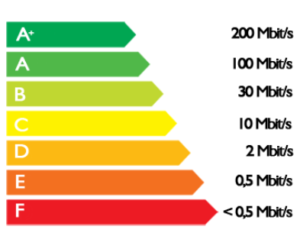
After completing this test, the results will appear, and you can interpret them using this short guide:
- A speed between D and F is considered slow (low throughput);
- A C-class speed between 3 and 7 Mb/s is classified as “medium speed”; it is at these speeds that remote work can begin to be carried out under good conditions.
- A speed of 8 Mb/s or higher is considered the threshold for a "broadband" connection.
- Connections faster than 30 Mb/s are classified as “ultra-high-speed.”
Sending Data (Upload)
This value represents the speed at which data is transmitted from your computer to the Internet; it is often referred to as “upload speed” or “Upload.”
An average data rate of 1.2 Mb/s is sufficient to transmit data from your computer.
Response time (ping)
This value represents the time it takes for a round trip between your computer and the server hosting the files used to measure the data download speed; it is often referred to as “latency.”

A value within the green range is required to ensure high-quality (uninterrupted) video conferences.
Improving Your Wi-Fi Connection
If the connection is not optimal (between D and F), you must:
- Use a wired connection whenever possible : The connection will be more stable, and devices connected via Wi-Fi will have better speeds.
- Positioning Your Set-Top Box Correctly : Avoid placing it under the TV or in a closed cabinet. Ideally, set it up about 1.50m above the floor in an open area. Never place anything on top of it, and plug it in directly (do not use a telephone extension cord or a power strip).
- Stop programs that are currently running: To get the most out of your bandwidth, be sure to turn off Wi-Fi on devices you’re not using (phones, smart devices).
- Disable automatic Wi-Fi scanning : By default, Windows constantly scans for nearby wireless networks. This feature, which is unnecessary if you always connect to your own network, consumes bandwidth.
- Check to make sure you don't have a virus: Whether by displaying ads or secretly using the computer's resources, some malware unnecessarily consumes bandwidth.
If, after checking all these steps, your connection is still weak, please contact your registrar’s office so they can help you access the exams under the best possible conditions. Please also feel free to report any problems you encounter during the exams.
Taking exams
With an optimal internet connection, students can take their exams.
To do this, students must log in the same way they do for tablet-based exams in lecture halls: log in from your device via SIDES + ENT authentication + enter the exam code.
The box codes will be sent by email before the event.
On the day of the test, we encourage students to, if possible, put themselves in an exam-like situation:
- Start the connection at least 15 minutes before the times listed (to allow for any unforeseen circumstances)
- Staying alone in a room
- Bring only the materials needed for the exam (pen, blank scratch paper, etc.)
- Do not attempt to connect to any applications other than the one required for the exam. This could disrupt the connection and interfere with your ability to write the exam.
Once the test begins, it's up to you!
We wish you the best of luck on your exams!
Bonus
In this article, you'll also find our tips for studying remotely!